> ## Documentation Index
> Fetch the complete documentation index at: https://docs-dev-fix-docs-5528-php-updates.mintlify.site/llms.txt
> Use this file to discover all available pages before exploring further.

> Configure an update policy form using Forms for Actions

# Use Cases: Configure an update policy form using Forms

<Card title="Before you start">
  1. Create a [Machine-to-Machine Application](/docs/get-started/auth0-overview/create-applications/machine-to-machine-apps) with the following scopes enabled:

  * `read:users`
  * `update:users`
  * `create:users`
  * `read:users_app_metadata`
  * `update:users_app_metadata`
  * `create:users_app_metadata`

  2. Add a [Vault connection](/docs/customize/forms/vault) using the M2M application credentials.
</Card>

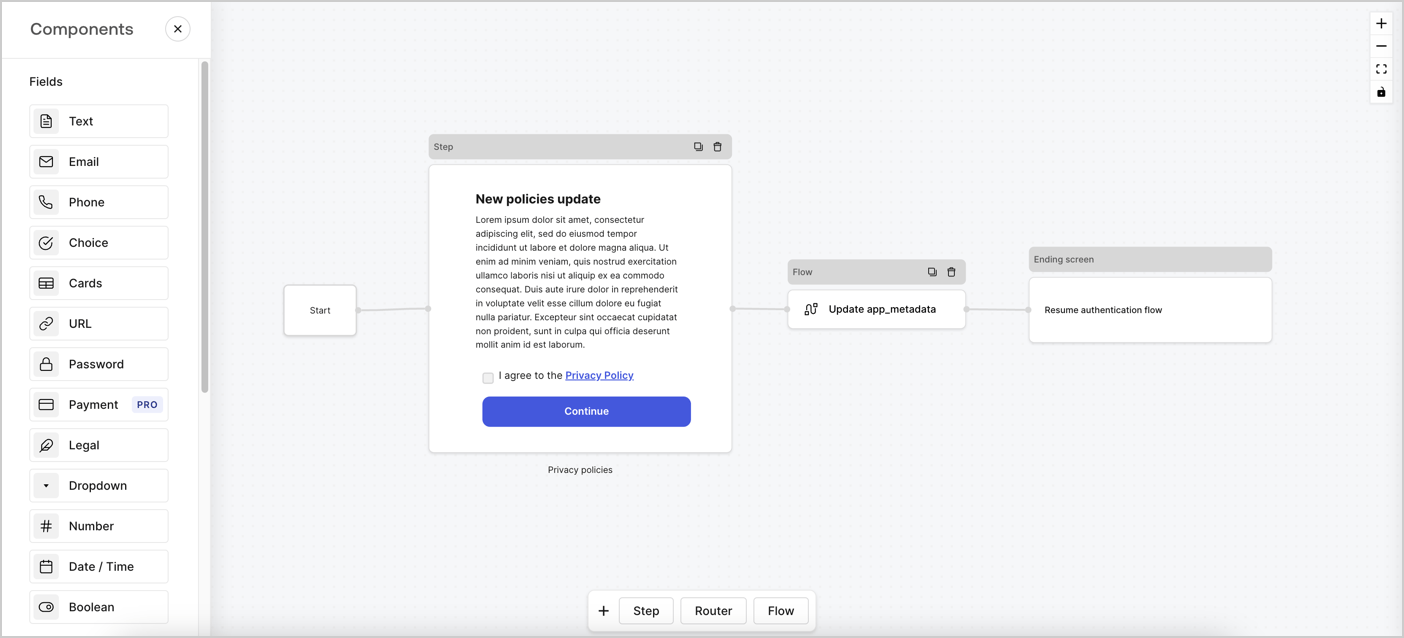
Forms for Actions allows you to create custom privacy policies flows and store the consent under the `app_metadata` object.
<Frame>
  <img src="https://mintcdn.com/docs-dev-fix-docs-5528-php-updates/M44QxikNuoaX0jkt/docs/images/cdy7uua7fh8z/6i68dMvHDTijfRmSgN1x8Q/ad900e7d4c0fb34645921435472b8684/privavy-policy-form.png?fit=max&auto=format&n=M44QxikNuoaX0jkt&q=85&s=b8adf37dbb87fa961fd326ef78cc190f" alt="Dashboard > Actions > Forms > Privacy policy use case" data-og-width="1404" width="1404" data-og-height="638" height="638" data-path="docs/images/cdy7uua7fh8z/6i68dMvHDTijfRmSgN1x8Q/ad900e7d4c0fb34645921435472b8684/privavy-policy-form.png" data-optimize="true" data-opv="3" srcset="https://mintcdn.com/docs-dev-fix-docs-5528-php-updates/M44QxikNuoaX0jkt/docs/images/cdy7uua7fh8z/6i68dMvHDTijfRmSgN1x8Q/ad900e7d4c0fb34645921435472b8684/privavy-policy-form.png?w=280&fit=max&auto=format&n=M44QxikNuoaX0jkt&q=85&s=468aeecbf3a45c3b09e6ec2d4e3d3af9 280w, https://mintcdn.com/docs-dev-fix-docs-5528-php-updates/M44QxikNuoaX0jkt/docs/images/cdy7uua7fh8z/6i68dMvHDTijfRmSgN1x8Q/ad900e7d4c0fb34645921435472b8684/privavy-policy-form.png?w=560&fit=max&auto=format&n=M44QxikNuoaX0jkt&q=85&s=a63d8cd29af4637643b8fccf90c052e0 560w, https://mintcdn.com/docs-dev-fix-docs-5528-php-updates/M44QxikNuoaX0jkt/docs/images/cdy7uua7fh8z/6i68dMvHDTijfRmSgN1x8Q/ad900e7d4c0fb34645921435472b8684/privavy-policy-form.png?w=840&fit=max&auto=format&n=M44QxikNuoaX0jkt&q=85&s=09a6cc7a705031e7e221f8023da18c2d 840w, https://mintcdn.com/docs-dev-fix-docs-5528-php-updates/M44QxikNuoaX0jkt/docs/images/cdy7uua7fh8z/6i68dMvHDTijfRmSgN1x8Q/ad900e7d4c0fb34645921435472b8684/privavy-policy-form.png?w=1100&fit=max&auto=format&n=M44QxikNuoaX0jkt&q=85&s=c76747016549ab8b86869186b8ccede4 1100w, https://mintcdn.com/docs-dev-fix-docs-5528-php-updates/M44QxikNuoaX0jkt/docs/images/cdy7uua7fh8z/6i68dMvHDTijfRmSgN1x8Q/ad900e7d4c0fb34645921435472b8684/privavy-policy-form.png?w=1650&fit=max&auto=format&n=M44QxikNuoaX0jkt&q=85&s=7053142a2f275e9a93d1560138473f3a 1650w, https://mintcdn.com/docs-dev-fix-docs-5528-php-updates/M44QxikNuoaX0jkt/docs/images/cdy7uua7fh8z/6i68dMvHDTijfRmSgN1x8Q/ad900e7d4c0fb34645921435472b8684/privavy-policy-form.png?w=2500&fit=max&auto=format&n=M44QxikNuoaX0jkt&q=85&s=b8fcb0ff2fc1c3c50db242cd4ffd49f2 2500w" />
</Frame>

The sections below outline how you can create an Update Policy form using nodes and flows, along with steps for adding your form to a [Post Login](/docs/customize/actions/explore-triggers/signup-and-login-triggers/login-trigger) Action.

## Create a form from scratch

Follow these steps to create a form to gather information:

1. Open the Form editor by selecting **Auth0 Dashboard > Actions > Forms.**
2. Select **Create Form** > **Start from scratch**.

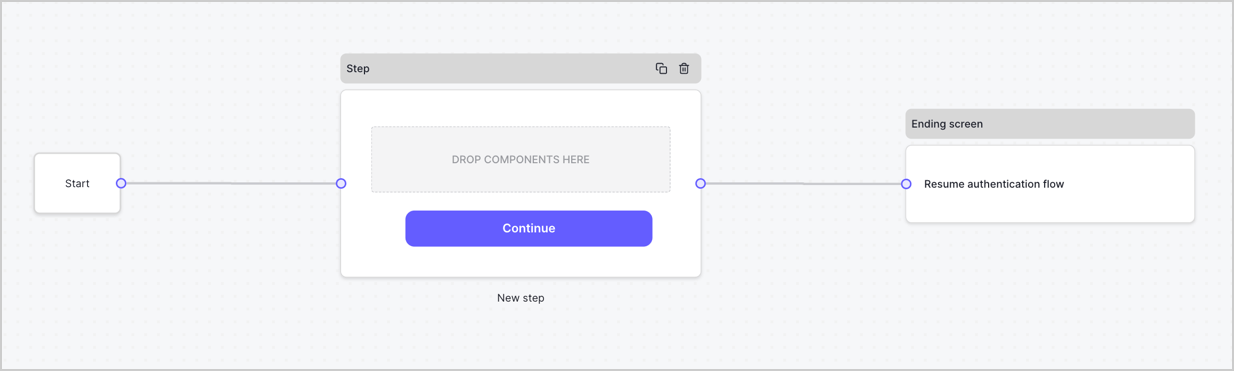
By default, a new form contains a Start node, a Step node, and an Ending screen node.
<Frame>
  <img src="https://mintcdn.com/docs-dev-fix-docs-5528-php-updates/0zW3kdEaq8oDQDJ5/docs/images/cdy7uua7fh8z/2TZ9jSjgEcARFpULI6hz4R/a4319a1bd482f2ee5cc23100fdb2f42c/New-form-Forms-for-action-use-case.png?fit=max&auto=format&n=0zW3kdEaq8oDQDJ5&q=85&s=f0955db9b4b3bad4a177f80cac5adf08" alt="Dashboard > Forms > Use Cases > Form" data-og-width="1234" width="1234" data-og-height="371" height="371" data-path="docs/images/cdy7uua7fh8z/2TZ9jSjgEcARFpULI6hz4R/a4319a1bd482f2ee5cc23100fdb2f42c/New-form-Forms-for-action-use-case.png" data-optimize="true" data-opv="3" srcset="https://mintcdn.com/docs-dev-fix-docs-5528-php-updates/0zW3kdEaq8oDQDJ5/docs/images/cdy7uua7fh8z/2TZ9jSjgEcARFpULI6hz4R/a4319a1bd482f2ee5cc23100fdb2f42c/New-form-Forms-for-action-use-case.png?w=280&fit=max&auto=format&n=0zW3kdEaq8oDQDJ5&q=85&s=9b8f521637e3737a14ef3ad25698efbc 280w, https://mintcdn.com/docs-dev-fix-docs-5528-php-updates/0zW3kdEaq8oDQDJ5/docs/images/cdy7uua7fh8z/2TZ9jSjgEcARFpULI6hz4R/a4319a1bd482f2ee5cc23100fdb2f42c/New-form-Forms-for-action-use-case.png?w=560&fit=max&auto=format&n=0zW3kdEaq8oDQDJ5&q=85&s=04222e210643c8659b419788bd9ecb81 560w, https://mintcdn.com/docs-dev-fix-docs-5528-php-updates/0zW3kdEaq8oDQDJ5/docs/images/cdy7uua7fh8z/2TZ9jSjgEcARFpULI6hz4R/a4319a1bd482f2ee5cc23100fdb2f42c/New-form-Forms-for-action-use-case.png?w=840&fit=max&auto=format&n=0zW3kdEaq8oDQDJ5&q=85&s=8d5a2113f4998c0bbf1877b686cbcc7e 840w, https://mintcdn.com/docs-dev-fix-docs-5528-php-updates/0zW3kdEaq8oDQDJ5/docs/images/cdy7uua7fh8z/2TZ9jSjgEcARFpULI6hz4R/a4319a1bd482f2ee5cc23100fdb2f42c/New-form-Forms-for-action-use-case.png?w=1100&fit=max&auto=format&n=0zW3kdEaq8oDQDJ5&q=85&s=c2d235a2dc0f226420e9f993f3af1e3b 1100w, https://mintcdn.com/docs-dev-fix-docs-5528-php-updates/0zW3kdEaq8oDQDJ5/docs/images/cdy7uua7fh8z/2TZ9jSjgEcARFpULI6hz4R/a4319a1bd482f2ee5cc23100fdb2f42c/New-form-Forms-for-action-use-case.png?w=1650&fit=max&auto=format&n=0zW3kdEaq8oDQDJ5&q=85&s=28c93bfaa7b2616e9dc0c2e095965888 1650w, https://mintcdn.com/docs-dev-fix-docs-5528-php-updates/0zW3kdEaq8oDQDJ5/docs/images/cdy7uua7fh8z/2TZ9jSjgEcARFpULI6hz4R/a4319a1bd482f2ee5cc23100fdb2f42c/New-form-Forms-for-action-use-case.png?w=2500&fit=max&auto=format&n=0zW3kdEaq8oDQDJ5&q=85&s=c7f2f56764f90170f8c7c0ca9d81ce5f 2500w" />
</Frame>

### Configure the Step node

The Step node is the graphical interface visible to users. Add [Fields](/docs/customize/forms/nodes-and-components) to the Step node to collect the new agreement acceptance value by following these steps:

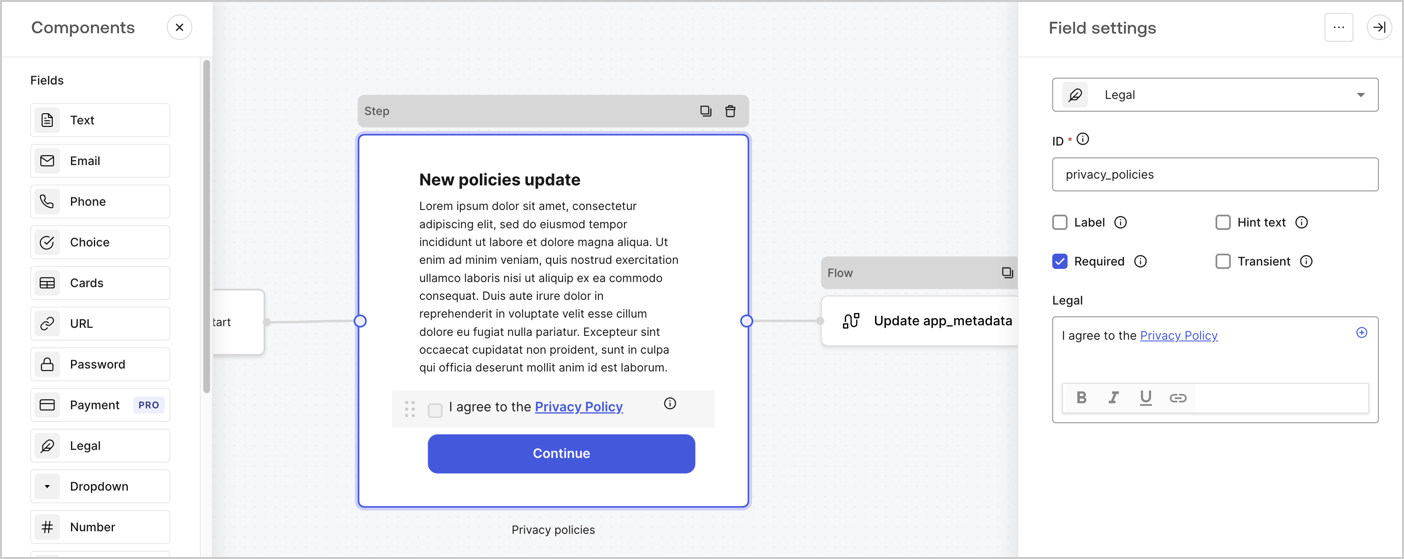
1. Drag a **Rich text** field from the **Components menu** into the **Step** node.

   * **Rich text**: Enter a description of your privacy policies updates.
   * Select **Save**.
2. Drag a **Legal** field into the **Step** node.

   * **ID**: Enter `privacy_policies`.
   * **Required**: Enable the checkbox.
   * **Legal**: Enter `I agree to the Privacy Policy`.
   * Select **Save**.
3. Select **Publish** to save.
<Frame>
  <img src="https://mintcdn.com/docs-dev-fix-docs-5528-php-updates/hw-JmwWtfkYrYJNq/docs/images/cdy7uua7fh8z/59zFFjQjAnjogkc2QGIqqJ/0ad66b1b636544122aa4e65968b76c2c/privacy-policy-step-node.png?fit=max&auto=format&n=hw-JmwWtfkYrYJNq&q=85&s=4b8c863bca312bcd34bfe3b88459bbf3" alt="Dashboard > Actions > Forms > Use case privacy policy step node" data-og-width="1404" width="1404" data-og-height="559" height="559" data-path="docs/images/cdy7uua7fh8z/59zFFjQjAnjogkc2QGIqqJ/0ad66b1b636544122aa4e65968b76c2c/privacy-policy-step-node.png" data-optimize="true" data-opv="3" srcset="https://mintcdn.com/docs-dev-fix-docs-5528-php-updates/hw-JmwWtfkYrYJNq/docs/images/cdy7uua7fh8z/59zFFjQjAnjogkc2QGIqqJ/0ad66b1b636544122aa4e65968b76c2c/privacy-policy-step-node.png?w=280&fit=max&auto=format&n=hw-JmwWtfkYrYJNq&q=85&s=32393e13679f3e44d85c29f3c5662cb2 280w, https://mintcdn.com/docs-dev-fix-docs-5528-php-updates/hw-JmwWtfkYrYJNq/docs/images/cdy7uua7fh8z/59zFFjQjAnjogkc2QGIqqJ/0ad66b1b636544122aa4e65968b76c2c/privacy-policy-step-node.png?w=560&fit=max&auto=format&n=hw-JmwWtfkYrYJNq&q=85&s=919e9098d728ac8827643c15594fb281 560w, https://mintcdn.com/docs-dev-fix-docs-5528-php-updates/hw-JmwWtfkYrYJNq/docs/images/cdy7uua7fh8z/59zFFjQjAnjogkc2QGIqqJ/0ad66b1b636544122aa4e65968b76c2c/privacy-policy-step-node.png?w=840&fit=max&auto=format&n=hw-JmwWtfkYrYJNq&q=85&s=b9df221518f2e7854971de9056cb04cd 840w, https://mintcdn.com/docs-dev-fix-docs-5528-php-updates/hw-JmwWtfkYrYJNq/docs/images/cdy7uua7fh8z/59zFFjQjAnjogkc2QGIqqJ/0ad66b1b636544122aa4e65968b76c2c/privacy-policy-step-node.png?w=1100&fit=max&auto=format&n=hw-JmwWtfkYrYJNq&q=85&s=65b842c5fd13c8f930c40d9b417f3b38 1100w, https://mintcdn.com/docs-dev-fix-docs-5528-php-updates/hw-JmwWtfkYrYJNq/docs/images/cdy7uua7fh8z/59zFFjQjAnjogkc2QGIqqJ/0ad66b1b636544122aa4e65968b76c2c/privacy-policy-step-node.png?w=1650&fit=max&auto=format&n=hw-JmwWtfkYrYJNq&q=85&s=e723bc1bdd18380f9796233aced15bab 1650w, https://mintcdn.com/docs-dev-fix-docs-5528-php-updates/hw-JmwWtfkYrYJNq/docs/images/cdy7uua7fh8z/59zFFjQjAnjogkc2QGIqqJ/0ad66b1b636544122aa4e65968b76c2c/privacy-policy-step-node.png?w=2500&fit=max&auto=format&n=hw-JmwWtfkYrYJNq&q=85&s=86f4abf1660b7e8d2f807a2a065475f9 2500w" />
</Frame>

### Configure the Flow node

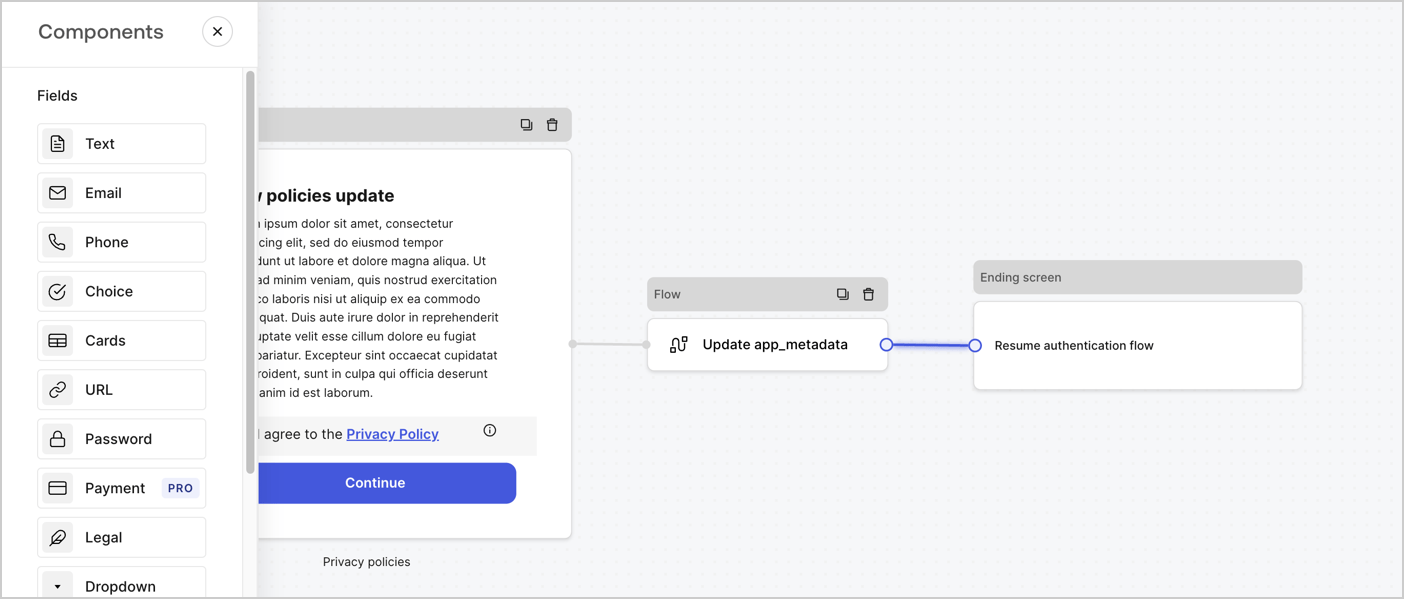
Add a **Flow** node after the **Step** node to update the `app_metadata` and resume the authentication flow by following these steps:

1. Select **Flow** from the bottom of the Form editor.
2. Remove the existing link between the **Step** and **Ending Screen** nodes.
3. Select the new **Flow** > **Click to add a flow** > **Create a new flow.**

   * Enter `Update app_metadata` in the **Name** field.
   * Select **Create**.
   * Select **Save**.
4. Link the **Flow** node to the **Step** and **Ending Screen** nodes as pictured below.
5. Select **Publish** to save.
<Frame>
  <img src="https://mintcdn.com/docs-dev-fix-docs-5528-php-updates/M44QxikNuoaX0jkt/docs/images/cdy7uua7fh8z/6YIkzm7SrpM9LW76AXuRzh/353c518fe82bbaa440836da1d83596d6/link-policies.png?fit=max&auto=format&n=M44QxikNuoaX0jkt&q=85&s=e19d3d83e6509a48164c7a9c10115910" alt="Dashboard > Actions > Forms > Form" data-og-width="1404" width="1404" data-og-height="599" height="599" data-path="docs/images/cdy7uua7fh8z/6YIkzm7SrpM9LW76AXuRzh/353c518fe82bbaa440836da1d83596d6/link-policies.png" data-optimize="true" data-opv="3" srcset="https://mintcdn.com/docs-dev-fix-docs-5528-php-updates/M44QxikNuoaX0jkt/docs/images/cdy7uua7fh8z/6YIkzm7SrpM9LW76AXuRzh/353c518fe82bbaa440836da1d83596d6/link-policies.png?w=280&fit=max&auto=format&n=M44QxikNuoaX0jkt&q=85&s=f0dd7031b5ff82e84bd4b3e07e92d655 280w, https://mintcdn.com/docs-dev-fix-docs-5528-php-updates/M44QxikNuoaX0jkt/docs/images/cdy7uua7fh8z/6YIkzm7SrpM9LW76AXuRzh/353c518fe82bbaa440836da1d83596d6/link-policies.png?w=560&fit=max&auto=format&n=M44QxikNuoaX0jkt&q=85&s=4e98ef0d01e73352d1036175d8c0f9cc 560w, https://mintcdn.com/docs-dev-fix-docs-5528-php-updates/M44QxikNuoaX0jkt/docs/images/cdy7uua7fh8z/6YIkzm7SrpM9LW76AXuRzh/353c518fe82bbaa440836da1d83596d6/link-policies.png?w=840&fit=max&auto=format&n=M44QxikNuoaX0jkt&q=85&s=7ef25677c6084c298de94d9164a88251 840w, https://mintcdn.com/docs-dev-fix-docs-5528-php-updates/M44QxikNuoaX0jkt/docs/images/cdy7uua7fh8z/6YIkzm7SrpM9LW76AXuRzh/353c518fe82bbaa440836da1d83596d6/link-policies.png?w=1100&fit=max&auto=format&n=M44QxikNuoaX0jkt&q=85&s=21737998a2c87ac8e7e41315a88c23ea 1100w, https://mintcdn.com/docs-dev-fix-docs-5528-php-updates/M44QxikNuoaX0jkt/docs/images/cdy7uua7fh8z/6YIkzm7SrpM9LW76AXuRzh/353c518fe82bbaa440836da1d83596d6/link-policies.png?w=1650&fit=max&auto=format&n=M44QxikNuoaX0jkt&q=85&s=fc0f59859cfc65f6109f566901b7c30b 1650w, https://mintcdn.com/docs-dev-fix-docs-5528-php-updates/M44QxikNuoaX0jkt/docs/images/cdy7uua7fh8z/6YIkzm7SrpM9LW76AXuRzh/353c518fe82bbaa440836da1d83596d6/link-policies.png?w=2500&fit=max&auto=format&n=M44QxikNuoaX0jkt&q=85&s=dcf03a4a700a9a13b30d8a9e946790b4 2500w" />
</Frame>

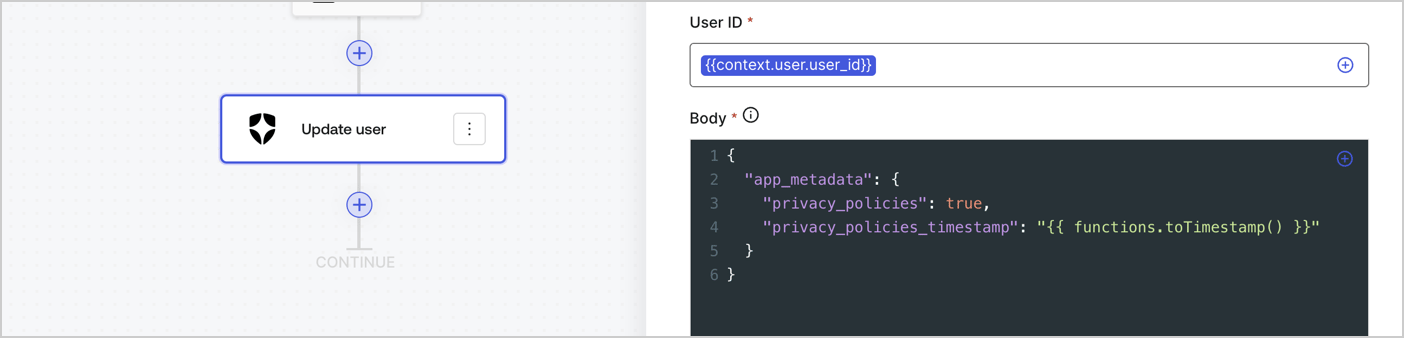
Add an Auth0 Update user action to the flow by following these steps:

1. Select the **Flow** **Update app\_metadata** > **Edit flow** to open the Flow editor in a new tab.
2. Below the StartAction, select the **+** icon to add an **Update user** action. Complete the fields below, then select **Save** to continue.

   * **Connection**: Select from the dropdown the Vault connection to your M2M application.

   * **User ID**: Enter `{{context.user.user_id}}`.

   * **Body**: Copy and paste the following code to update the app\_metadata with the privacy\_policies and privacy\_policies\_timestamp properties.

     ```text lines theme={null}
     {
       "app_metadata": {
         "privacy_policies": true,
         "privacy_policies_timestamp": "{{ functions.toTimestamp() }}"
       }
     }
     ```

   * Select **Save**.
3. Select **Publish** to save.
<Frame>
  <img src="https://mintcdn.com/docs-dev-fix-docs-5528-php-updates/pPV-MWNcqmpeX-86/docs/images/cdy7uua7fh8z/CvMNIwWrOUwaFW4X3G28p/1fb70ae57a20749d9ffaaba8dc0b7e26/update-user-privacy.png?fit=max&auto=format&n=pPV-MWNcqmpeX-86&q=85&s=4c35c97df571e83c60aa6e24b397f72a" alt="Dashboard > Actions > Forms > User case privacy policy code" data-og-width="1404" width="1404" data-og-height="338" height="338" data-path="docs/images/cdy7uua7fh8z/CvMNIwWrOUwaFW4X3G28p/1fb70ae57a20749d9ffaaba8dc0b7e26/update-user-privacy.png" data-optimize="true" data-opv="3" srcset="https://mintcdn.com/docs-dev-fix-docs-5528-php-updates/pPV-MWNcqmpeX-86/docs/images/cdy7uua7fh8z/CvMNIwWrOUwaFW4X3G28p/1fb70ae57a20749d9ffaaba8dc0b7e26/update-user-privacy.png?w=280&fit=max&auto=format&n=pPV-MWNcqmpeX-86&q=85&s=b175fcc71664645c42e749a7b9b894be 280w, https://mintcdn.com/docs-dev-fix-docs-5528-php-updates/pPV-MWNcqmpeX-86/docs/images/cdy7uua7fh8z/CvMNIwWrOUwaFW4X3G28p/1fb70ae57a20749d9ffaaba8dc0b7e26/update-user-privacy.png?w=560&fit=max&auto=format&n=pPV-MWNcqmpeX-86&q=85&s=b95d1a079cfa9a41ee529f7757f3e036 560w, https://mintcdn.com/docs-dev-fix-docs-5528-php-updates/pPV-MWNcqmpeX-86/docs/images/cdy7uua7fh8z/CvMNIwWrOUwaFW4X3G28p/1fb70ae57a20749d9ffaaba8dc0b7e26/update-user-privacy.png?w=840&fit=max&auto=format&n=pPV-MWNcqmpeX-86&q=85&s=923b523e9d0637f208c6df3fd05413c9 840w, https://mintcdn.com/docs-dev-fix-docs-5528-php-updates/pPV-MWNcqmpeX-86/docs/images/cdy7uua7fh8z/CvMNIwWrOUwaFW4X3G28p/1fb70ae57a20749d9ffaaba8dc0b7e26/update-user-privacy.png?w=1100&fit=max&auto=format&n=pPV-MWNcqmpeX-86&q=85&s=c963d2b01eba4524012359f041b2296b 1100w, https://mintcdn.com/docs-dev-fix-docs-5528-php-updates/pPV-MWNcqmpeX-86/docs/images/cdy7uua7fh8z/CvMNIwWrOUwaFW4X3G28p/1fb70ae57a20749d9ffaaba8dc0b7e26/update-user-privacy.png?w=1650&fit=max&auto=format&n=pPV-MWNcqmpeX-86&q=85&s=2859c83b07cb4e3d9bec93e7dacf22bb 1650w, https://mintcdn.com/docs-dev-fix-docs-5528-php-updates/pPV-MWNcqmpeX-86/docs/images/cdy7uua7fh8z/CvMNIwWrOUwaFW4X3G28p/1fb70ae57a20749d9ffaaba8dc0b7e26/update-user-privacy.png?w=2500&fit=max&auto=format&n=pPV-MWNcqmpeX-86&q=85&s=b94fbfdb22698f7aeacd2b76df6a609f 2500w" />
</Frame>

<Callout icon="file-lines" color="#0EA5E9" iconType="regular">
  The flow **Update app\_metadata** adds a `privacy_policies true` value to the app`_metadata` object and also generates a timestamp with a [helper function.](/docs/customize/forms/variables)
</Callout>

## Retrieve the form render code

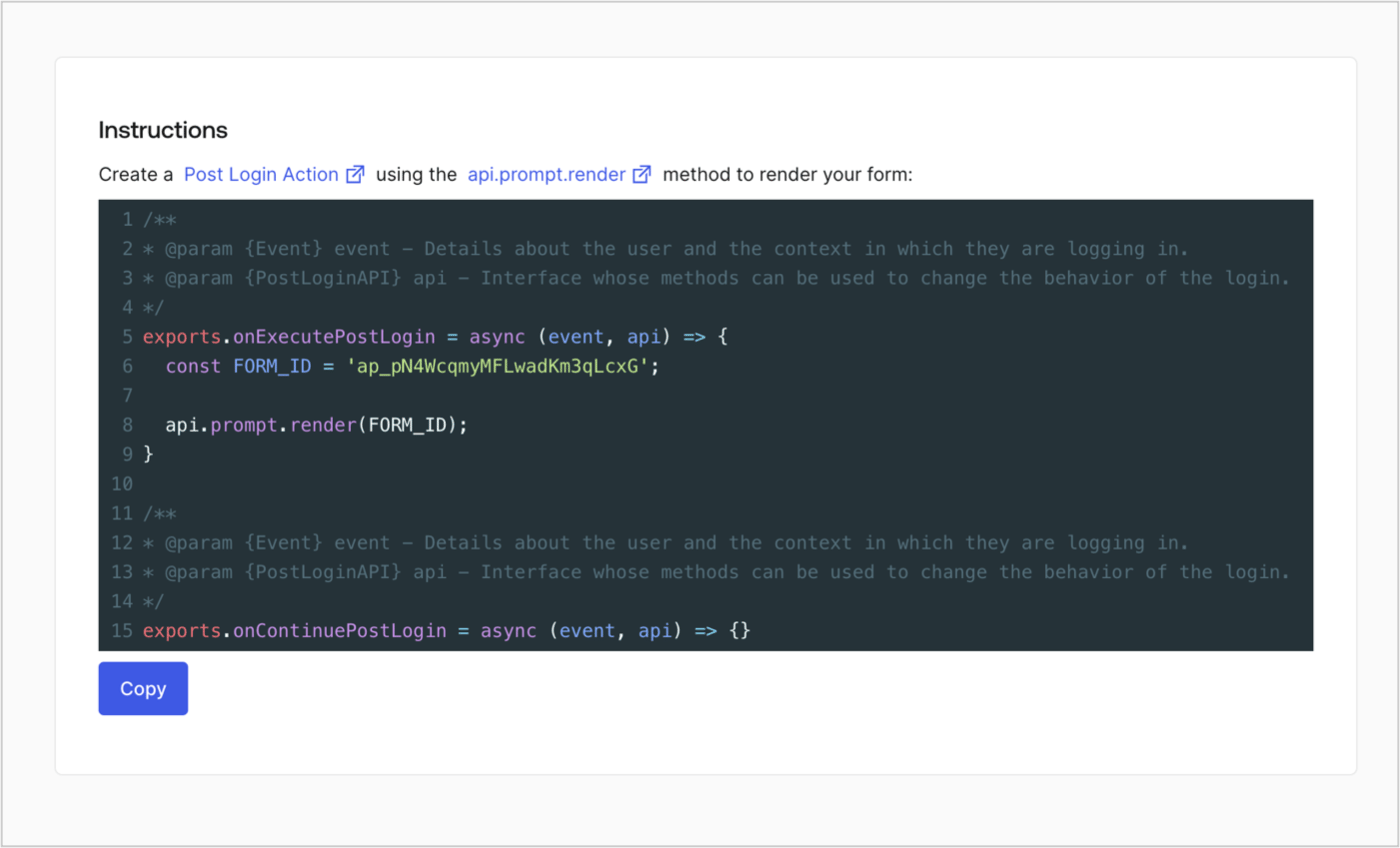
Retrieve your form render code to visually render the form with a custom Post Login Action by following these steps:

* From the Form editor, select **`<> Render`**.
* Select **Copy**.
<Frame>
  <img src="https://mintcdn.com/docs-dev-fix-docs-5528-php-updates/vw0h4BWfRvH7r7TX/docs/images/cdy7uua7fh8z/2EIUzc539sq9lwoTKbjoJv/496a864c0fc44a782c9cadca119dbfb0/embed.png?fit=max&auto=format&n=vw0h4BWfRvH7r7TX&q=85&s=fd59661ddfdd924cd97cb9c5ba4b24ab" alt="Dashboard > Actions > Forms > Form > Embed" data-og-width="1400" width="1400" data-og-height="848" height="848" data-path="docs/images/cdy7uua7fh8z/2EIUzc539sq9lwoTKbjoJv/496a864c0fc44a782c9cadca119dbfb0/embed.png" data-optimize="true" data-opv="3" srcset="https://mintcdn.com/docs-dev-fix-docs-5528-php-updates/vw0h4BWfRvH7r7TX/docs/images/cdy7uua7fh8z/2EIUzc539sq9lwoTKbjoJv/496a864c0fc44a782c9cadca119dbfb0/embed.png?w=280&fit=max&auto=format&n=vw0h4BWfRvH7r7TX&q=85&s=1107b9d57f8acc31a236b73594065078 280w, https://mintcdn.com/docs-dev-fix-docs-5528-php-updates/vw0h4BWfRvH7r7TX/docs/images/cdy7uua7fh8z/2EIUzc539sq9lwoTKbjoJv/496a864c0fc44a782c9cadca119dbfb0/embed.png?w=560&fit=max&auto=format&n=vw0h4BWfRvH7r7TX&q=85&s=07969fb40b8f48676073cdd1a0e78f1e 560w, https://mintcdn.com/docs-dev-fix-docs-5528-php-updates/vw0h4BWfRvH7r7TX/docs/images/cdy7uua7fh8z/2EIUzc539sq9lwoTKbjoJv/496a864c0fc44a782c9cadca119dbfb0/embed.png?w=840&fit=max&auto=format&n=vw0h4BWfRvH7r7TX&q=85&s=817bda8c1ab7e5098c414ebccd2aed0d 840w, https://mintcdn.com/docs-dev-fix-docs-5528-php-updates/vw0h4BWfRvH7r7TX/docs/images/cdy7uua7fh8z/2EIUzc539sq9lwoTKbjoJv/496a864c0fc44a782c9cadca119dbfb0/embed.png?w=1100&fit=max&auto=format&n=vw0h4BWfRvH7r7TX&q=85&s=7e47f7baf0a2219a835afa7e517c8d36 1100w, https://mintcdn.com/docs-dev-fix-docs-5528-php-updates/vw0h4BWfRvH7r7TX/docs/images/cdy7uua7fh8z/2EIUzc539sq9lwoTKbjoJv/496a864c0fc44a782c9cadca119dbfb0/embed.png?w=1650&fit=max&auto=format&n=vw0h4BWfRvH7r7TX&q=85&s=f34f9601378c9baaf7d141896dc92a63 1650w, https://mintcdn.com/docs-dev-fix-docs-5528-php-updates/vw0h4BWfRvH7r7TX/docs/images/cdy7uua7fh8z/2EIUzc539sq9lwoTKbjoJv/496a864c0fc44a782c9cadca119dbfb0/embed.png?w=2500&fit=max&auto=format&n=vw0h4BWfRvH7r7TX&q=85&s=836cd1c7c548bb9382f5191f92bf27bc 2500w" />
</Frame>

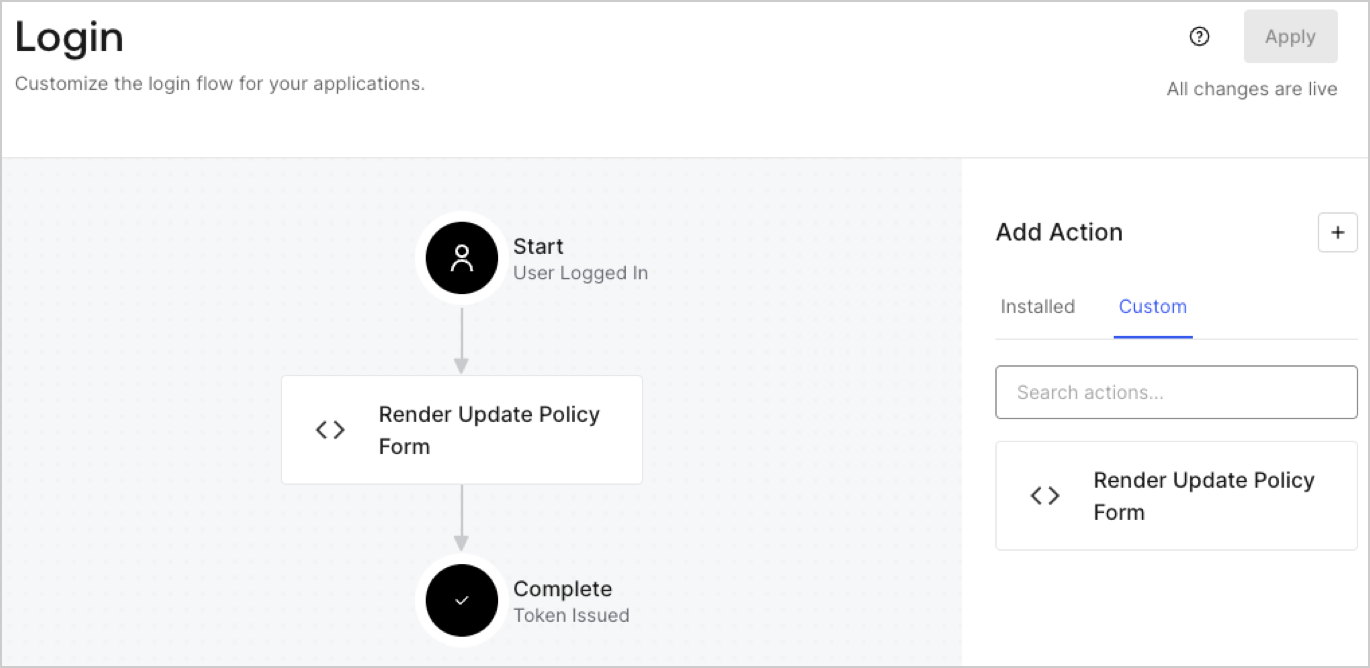
## Create a Post Login Action

Create a post-login Action to render your form by following these steps:

1. Navigate to **Auth0 Dashboard > Actions > Flows > Login.**
2. Select the **+** icon and Select **Build from scratch**:

   * **Name**: Enter `Render Update Policy Form`.
   * **Trigger**: Select `Login / Post Login`.
   * **Runtime**: Select the recommended version.
3. Select **Create**.

To configure the post-login Action:

1. Delete the existing code from the Code editor.
2. Paste the form render code into the Code editor.
3. Edit the code to define the conditional logic that will render the form.

   ```javascript lines theme={null}
   /**
   * @param {Event} event - Details about the user and the context in which they are logging in.
   * @param {PostLoginAPI} api - Interface whose methods can be used to change the behavior of the login.
   */
   exports.onExecutePostLogin = async (event, api) => {
     const FORM_ID = 'REPLACE_WITH_YOUR_FORM_ID';

     if (event.user.app_metadata.privacy_policies !== true) {
       api.prompt.render(FORM_ID);
     }
   }

   exports.onContinuePostLogin = async (event, api) => { }
   ```

   <Callout icon="file-lines" color="#0EA5E9" iconType="regular">
     The example code above will render the form when a user is missing the app metadata `privacy_policies` property.
   </Callout>
4. Select **Deploy.**
5. Drag and Drop the **Render Update Policy Form** Action to the **Login** flow.
   <Frame>
     <img src="https://mintcdn.com/docs-dev-fix-docs-5528-php-updates/8FCtvUuQL6Cfis-u/docs/images/cdy7uua7fh8z/5TOwDgevZsBqd7yZynUYWU/41ca909dc3007aed4f40ff794a05efa5/postlogin.png?fit=max&auto=format&n=8FCtvUuQL6Cfis-u&q=85&s=6d2e505e4944c19b87d3f0cc0c77ab48" alt="Dashboard > Forms > Use Case > Render update policy form login action" data-og-width="1370" width="1370" data-og-height="668" height="668" data-path="docs/images/cdy7uua7fh8z/5TOwDgevZsBqd7yZynUYWU/41ca909dc3007aed4f40ff794a05efa5/postlogin.png" data-optimize="true" data-opv="3" srcset="https://mintcdn.com/docs-dev-fix-docs-5528-php-updates/8FCtvUuQL6Cfis-u/docs/images/cdy7uua7fh8z/5TOwDgevZsBqd7yZynUYWU/41ca909dc3007aed4f40ff794a05efa5/postlogin.png?w=280&fit=max&auto=format&n=8FCtvUuQL6Cfis-u&q=85&s=fb4307f84cfce9b6eec9da8d5aff8b74 280w, https://mintcdn.com/docs-dev-fix-docs-5528-php-updates/8FCtvUuQL6Cfis-u/docs/images/cdy7uua7fh8z/5TOwDgevZsBqd7yZynUYWU/41ca909dc3007aed4f40ff794a05efa5/postlogin.png?w=560&fit=max&auto=format&n=8FCtvUuQL6Cfis-u&q=85&s=cc26281731080fc59a8b5a239acac76e 560w, https://mintcdn.com/docs-dev-fix-docs-5528-php-updates/8FCtvUuQL6Cfis-u/docs/images/cdy7uua7fh8z/5TOwDgevZsBqd7yZynUYWU/41ca909dc3007aed4f40ff794a05efa5/postlogin.png?w=840&fit=max&auto=format&n=8FCtvUuQL6Cfis-u&q=85&s=b1dacb1f9e4696b8b6a18fd3550c3a01 840w, https://mintcdn.com/docs-dev-fix-docs-5528-php-updates/8FCtvUuQL6Cfis-u/docs/images/cdy7uua7fh8z/5TOwDgevZsBqd7yZynUYWU/41ca909dc3007aed4f40ff794a05efa5/postlogin.png?w=1100&fit=max&auto=format&n=8FCtvUuQL6Cfis-u&q=85&s=f41b76017c8ffb90271a0e1122a4f5ff 1100w, https://mintcdn.com/docs-dev-fix-docs-5528-php-updates/8FCtvUuQL6Cfis-u/docs/images/cdy7uua7fh8z/5TOwDgevZsBqd7yZynUYWU/41ca909dc3007aed4f40ff794a05efa5/postlogin.png?w=1650&fit=max&auto=format&n=8FCtvUuQL6Cfis-u&q=85&s=86b5de12827ea229b22e0d582ab4bf5c 1650w, https://mintcdn.com/docs-dev-fix-docs-5528-php-updates/8FCtvUuQL6Cfis-u/docs/images/cdy7uua7fh8z/5TOwDgevZsBqd7yZynUYWU/41ca909dc3007aed4f40ff794a05efa5/postlogin.png?w=2500&fit=max&auto=format&n=8FCtvUuQL6Cfis-u&q=85&s=ceb3167e50b1f594d21323f8cac75191 2500w" />
   </Frame>
6. Select **Apply.**

### Test implementation

Test the implementation by following these steps:

1. Log in with an existing user whose app`_metadata` attribute `privacy_policies` does not have a value.
2. The post-login Action in the Login flow will render the form and prompt for acceptance.
3. Select **Auth0 Dashboard > User Management > Users,** locate the user and verify that the `app_metadata` attribute `privacy_policies` contains a `true` value and a timestamp.
