> ## Documentation Index
> Fetch the complete documentation index at: https://docs-dev-fix-docs-5528-php-updates.mintlify.site/llms.txt
> Use this file to discover all available pages before exploring further.
# Vérification du caractère confidentiel ou public d’une application
> Explique comment vérifier si une application est enregistrée auprès d’Auth0 en tant qu’application confidentielle ou publique à l’aide du Auth0 Management Dashboard.
Vous pouvez vérifier si une application est enregistrée auprès d’Auth0 en tant qu’application confidentielle ou publique. Pour en savoir plus, lisez [Application confidentielle et publique](/docs/fr-ca/get-started/applications/confidential-and-public-applications).
Auth0 détermine si une application est confidentielle ou publique en fonction du paramètre **Méthode d’authentification** qui définit comment une application s’authentifie auprès du point de terminaison [Obtenir un jeton](https://auth0.com/docs/api/authentication#get-token) de la Auth0 Authentication API.
1. Dans le Auth0 Dashboard, allez dans [Applications > Applications](https://manage.auth0.com/#/applications), puis sélectionnez le nom de l’application à afficher.
2. Si la section **Identifiants** n’est pas disponible, cela signifie qu’il s’agit d’une application publique.
3. Si la section **Identifiants Auth0** est disponible, sélectionnez-la et localisez le champ **Méthode d’authentification**.
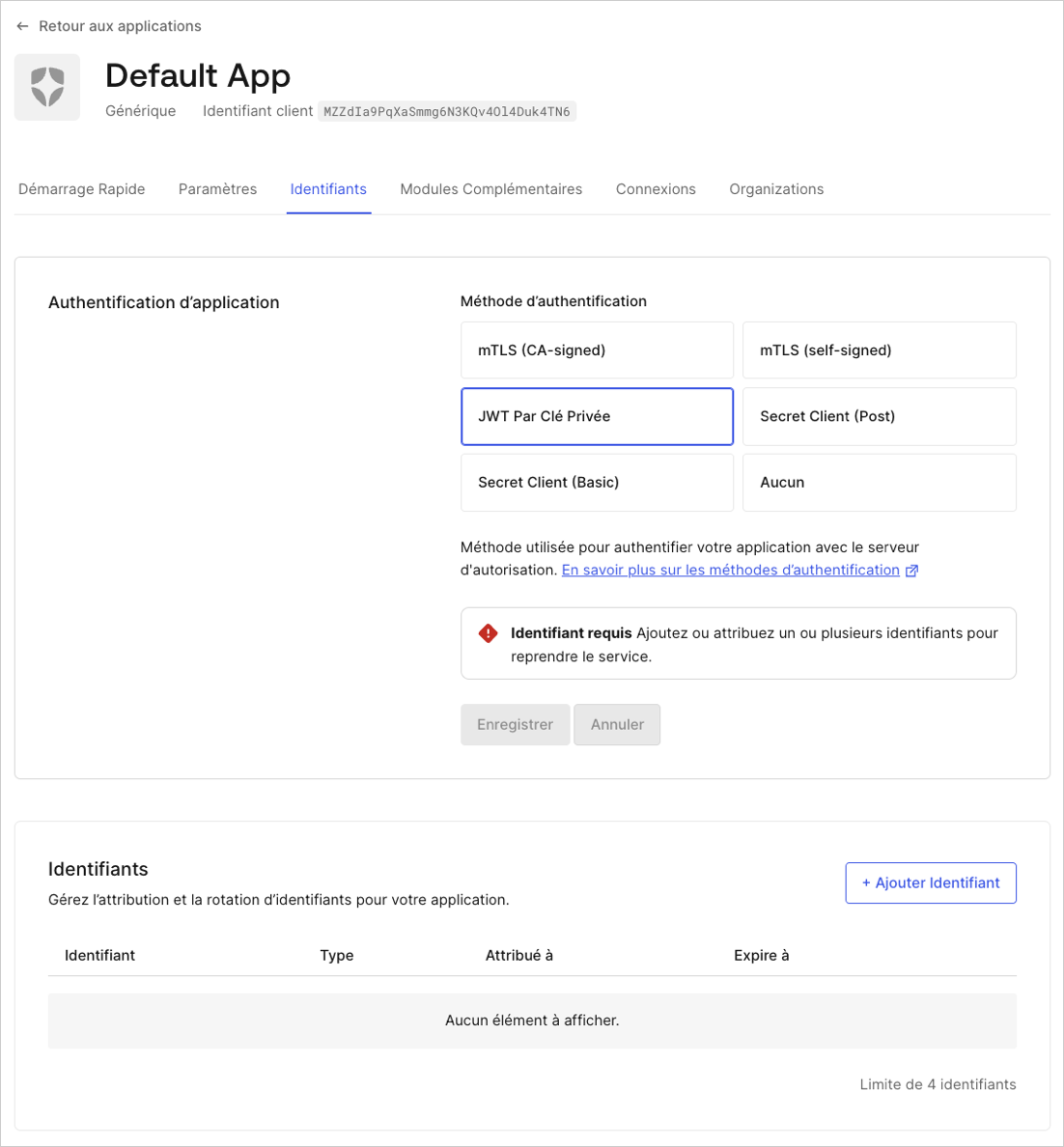 Utilisez la méthode applicable :
* **Aucune**: Application publique sans secret client.
* **Publication du secret client** : Application utilisant les paramètres du corps de la requête POST pour envoyer un secret client.
* **Secret client de base** : Application utilisant le schéma d’authentification HTTP BASIC pour envoyer un secret client.
* **Clé privée JWT** : Application utilisant l’authentification asymétrique.
Ces valeurs correspondent aux applications confidentielles et publiques comme suit :
| Type d’application | Exemple | Méthode d’authentification du point de terminaison du jeton |
| ------------------ | --------------------------------------------- | ----------------------------------------------------------- |
| **Publique** | À page unique ou natives | **Aucun** |
| **Confidentielle** | Web standards ou communication entre machines | **Basic**, **Post**, **clé privée JWT**, **Non spécifié** |
Les applications publiques ne sont pas en mesure d’assurer la confidentialité des informations d’identification requises pour les méthodes d’authentification par point de terminaison de jeton, comme **Post** et **Basic**.
Utilisez la méthode applicable :
* **Aucune**: Application publique sans secret client.
* **Publication du secret client** : Application utilisant les paramètres du corps de la requête POST pour envoyer un secret client.
* **Secret client de base** : Application utilisant le schéma d’authentification HTTP BASIC pour envoyer un secret client.
* **Clé privée JWT** : Application utilisant l’authentification asymétrique.
Ces valeurs correspondent aux applications confidentielles et publiques comme suit :
| Type d’application | Exemple | Méthode d’authentification du point de terminaison du jeton |
| ------------------ | --------------------------------------------- | ----------------------------------------------------------- |
| **Publique** | À page unique ou natives | **Aucun** |
| **Confidentielle** | Web standards ou communication entre machines | **Basic**, **Post**, **clé privée JWT**, **Non spécifié** |
Les applications publiques ne sont pas en mesure d’assurer la confidentialité des informations d’identification requises pour les méthodes d’authentification par point de terminaison de jeton, comme **Post** et **Basic**.