> ## Documentation Index
> Fetch the complete documentation index at: https://docs-dev-fix-docs-5528-php-updates.mintlify.site/llms.txt
> Use this file to discover all available pages before exploring further.
# OpenID ConnectのIDプロバイダーに接続する
> エンタープライズ接続を用いてOpenID Connect(OIDC)のIDプロバイダーに接続する方法を説明します。
export const AuthCodeGroup = ({children, dropdown}) => {
const [processedChildren, setProcessedChildren] = useState(children);
useEffect(() => {
let unsubscribe = null;
function init() {
unsubscribe = window.autorun(() => {
const processChildren = node => {
if (typeof node === "string") {
let processedNode = node;
for (const [key, value] of window.rootStore.variableStore.values.entries()) {
const escapedKey = key.replaceAll(/[.*+?^${}()|[\]\\]/g, (String.raw)`\$&`);
processedNode = processedNode.replaceAll(new RegExp(escapedKey, "g"), value);
}
return processedNode;
} else if (Array.isArray(node)) {
return node.map(processChildren);
} else if (node && node.props && node.props.children) {
return {
...node,
props: {
...node.props,
children: processChildren(node.props.children)
}
};
}
return node;
};
setProcessedChildren(processChildren(children));
});
}
if (window.rootStore) {
init();
} else {
window.addEventListener("adu:storeReady", init);
}
return () => {
window.removeEventListener("adu:storeReady", init);
unsubscribe?.();
};
}, [children]);
return {processedChildren};
};
export const AuthCodeBlock = ({filename, icon, language, highlight, children}) => {
const [displayText, setDisplayText] = useState(children);
const [copyText, setCopyText] = useState(children);
const wrapperRef = React.useRef(null);
useEffect(() => {
let unsubscribe = null;
function init() {
if (!window.autorun || !window.rootStore) {
return;
}
unsubscribe = window.autorun(() => {
let processedChildrenForDisplay = children;
let processedChildrenForCopy = children;
for (const [key, value] of window.rootStore.variableStore.values.entries()) {
const escapedKey = key.replaceAll(/[.*+?^${}()|[\]\\]/g, (String.raw)`\$&`);
let displayValue = value;
if (key === "{yourClientSecret}" && value !== "{yourClientSecret}") {
displayValue = value.substring(0, 3) + "*****MASKED*****";
}
processedChildrenForDisplay = processedChildrenForDisplay.replaceAll(new RegExp(escapedKey, "g"), displayValue);
processedChildrenForCopy = processedChildrenForCopy.replaceAll(new RegExp(escapedKey, "g"), value);
}
setDisplayText(processedChildrenForDisplay);
setCopyText(processedChildrenForCopy);
});
}
if (window.rootStore) {
init();
} else {
window.addEventListener("adu:storeReady", init);
}
return () => {
window.removeEventListener("adu:storeReady", init);
unsubscribe?.();
};
}, [children]);
useEffect(() => {
if (!wrapperRef.current) return;
const originalWriteText = navigator.clipboard.writeText.bind(navigator.clipboard);
let isOverriding = false;
const handleClick = e => {
const button = e.target.closest('[data-testid="copy-code-button"]');
if (!button || !wrapperRef.current.contains(button)) return;
isOverriding = true;
navigator.clipboard.writeText = text => {
if (isOverriding) {
isOverriding = false;
navigator.clipboard.writeText = originalWriteText;
return originalWriteText(copyText);
}
return originalWriteText(text);
};
setTimeout(() => {
if (isOverriding) {
isOverriding = false;
navigator.clipboard.writeText = originalWriteText;
}
}, 100);
};
const wrapper = wrapperRef.current;
wrapper.addEventListener('click', handleClick, true);
return () => {
wrapper.removeEventListener('click', handleClick, true);
if (navigator.clipboard.writeText !== originalWriteText) {
navigator.clipboard.writeText = originalWriteText;
}
};
}, [copyText]);
return
{displayText}
;
};
## 前提条件
* [Auth0にアプリケーションを登録します](/docs/ja-jp/get-started/auth0-overview/create-applications)。
* 適切な **[Application Type(アプリケーションタイプ)]** を選択します。
* **`{https://yourApp/callback}`** の **[Allowed Callback URL(許可されているコールバックURL)]** を追加します。
* アプリケーションの[[Grant Types(付与タイプ)]](/docs/ja-jp/get-started/applications/update-grant-types)に適切なフローが必ず含まれていることを確認してください。
## 手順
アプリケーションをOIDCのIDプロバイダーに接続するには、以下を行います。
1. [OpenID ConnectのIDプロバイダーでアプリをセットアップする](#set-up-your-app-in-the-openid-connect-identity-provider)
2. [Auth0でエンタープライズ接続を作成する](#create-an-enterprise-connection-in-auth0)
3. [Auth0アプリケーションでエンタープライズ接続を有効にする](#enable-the-enterprise-connection-for-your-auth0-application)
4. [接続をテストする](#test-the-connection)
## OIDCのIDプロバイダーでアプリをセットアップする
OIDCのIDプロバイダーを使用してユーザーがログインできるようにするには、IdPでアプリケーションを登録する必要があります。このプロセスはOIDCのIDプロバイダーによって異なるため、プロバイダーのドキュメンテーションに従って作業を行う必要があります。
一般に、いずれかの時点で次のコールバックURLを入力するようにしてください:`https://{yourDomain}/login/callback`
上記で、 [カスタムドメイン](/docs/ja-jp/customize/custom-domains)機能を使っていないのにAuth0ドメイン名が表示されない場合は、ドメイン名がテナント名、地域のサブドメイン、および「`auth0.com`」をドット記号(「`.`」)で区切って連結したものだからです。
たとえば、テナント名が「`exampleco-enterprises`」でテナントがUS地域にある場合、Auth0ドメイン名は「`exampleco-enterprises.us.auth0.com`」、 **Redirect URI(リダイレクトURI)** は「`https://exampleco-enterprises.us.auth0.com/login/callback`」になります。
ただし、テナントがUS地域にあり、2020年6月よりも前に作成された場合、Auth0ドメイン名は「`exampleco-enterprises.auth0.com` 」、 **Redirect URI(リダイレクトURI)** は「`https://exampleco-enterprises.auth0.com/login/callback`」になります。
[カスタムドメイン](/docs/ja-jp/customize/custom-domains)を使っている場合、 **Redirect URI(リダイレクトURI)** は「`https:///login/callback`」になります。
このプロセス中に、OIDCのIDプロバイダーは、通常 **クライアントID** または **アプリケーションID** と呼ばれる、登録済みAPIに対する一意の識別子を生成します。この値は書きとめておいてください。後で必要になります。
## Auth0でエンタープライズ接続を作成する
次に、Auth0でOIDCのエンタープライズ接続を作成・構成する必要があります。OIDCプロバイダーでアプリをセットアップする際に、 **[Application (client) ID(アプリケーション(クライアント)ID)]** と **[Client secret(クライアントシークレット)]** が生成されていることを確認してください。
### Auth0 Dashboardを使用してエンタープライズ接続を作成する
Auth0 Dashboardを介した構成を可能にするためには、OpenID Connect(OIDC)IDプロバイダー(IdP)が[OIDC検出](https://openid.net/specs/openid-connect-discovery-1_0.html)をサポートしている必要があります。それ以外の場合は、[Management APIを使用して接続を構成](#configure-the-connection-using-the-management-api)できます。
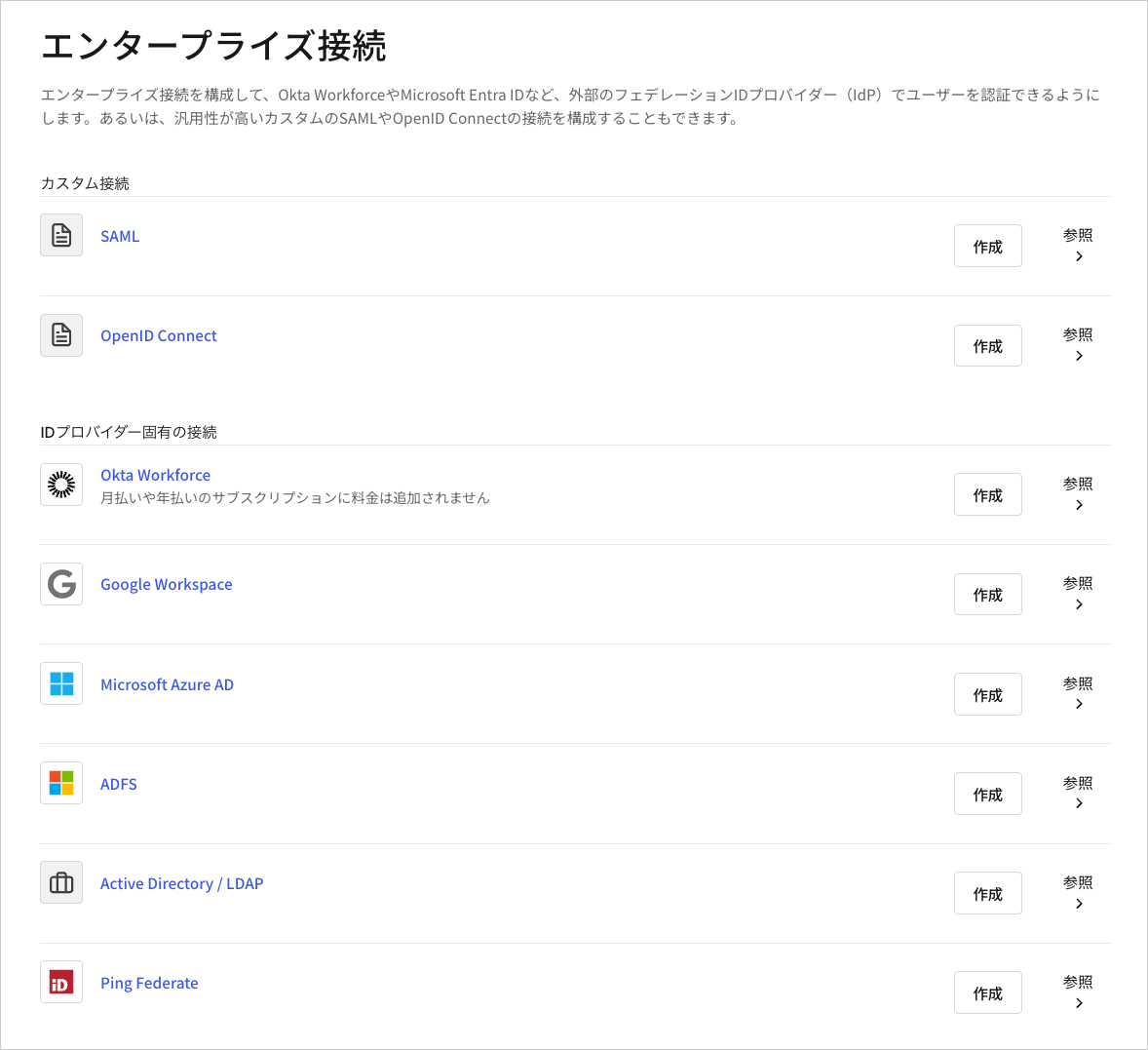
1. [[Auth0 Dashboard]>[Authentication(認証)]>[Enterprise(エンタープライズ)]](https://manage.auth0.com/#/connections/enterprise)に移動し、 **Open ID Connect** の[`+`]記号をクリックします。
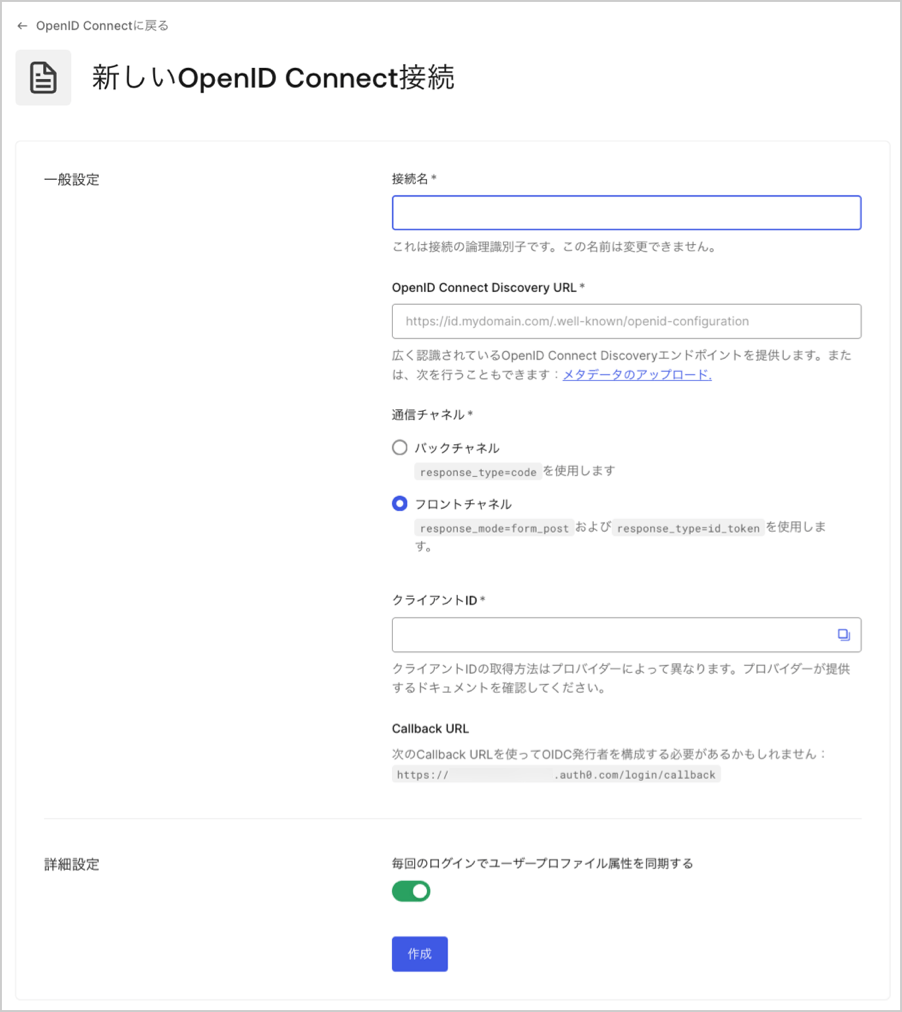
 2. 接続の詳細を入力し、 **[Create(作成)]** をクリックします。
| フィールド | 説明 |
| ------------------------------------------------------------------------- | ----------------------------------------------------------------------------------------------------------------------------------------------------------------------------------------------------------------------------------------------------------------------------------------------------------------------------------------------------------------------------------------------------------------------------------------------------------------- |
| **Connection name(接続名)** | 接続の論理識別子です。テナント内で一意でなければなりません。一度設定すると、この名前は変更できません。 |
| **OpenID Connect Discovery URL** | **[広く認識されているOpenID Connect Discoveryエンドポイント](https://openid.net/specs/openid-connect-discovery-1_0.html)** をAuth0が見つけられるURLで、通常は`/.well-known/openid-configuration`エンドポイントにあります。ベースURLまたは完全URLを入力できます。その場所で見つかった場合には緑のチェックマーク、見つからない場合には赤いチェックマークが表示されます。ファイルは見つかったものの、構成ファイルに必要な情報がない場合には、エラーメッセージが表示されます。詳細については、「[OIDC Discoveryを使用してアプリケーションを構成する](https://auth0.com/docs/ja-jp/get-started/applications/configure-applications-with-oidc-discovery)をお読みください。 |
| **Communication Channel(通信チャネル)** | **[Front Channel(フロントチャネル)]**または**[Back Channel(バックチャネル)]** に設定します。フロントチャネルは使用するOIDCプロトコルに`response_mode=form_post`と`response_type=id_token`を指定します。バックチャネルは`response_type=code`を使用します。 |
| **Client ID(クライアントID)** | プロバイダーが提供する識別子です。登録したアプリケーションの一意の識別子です。OIDC IDプロバイダーに登録したアプリについて保存済みのクライアントIDの値を入力します。プロバイダーはそれぞれこの手順を独自の方法で管理しています。 |
| **Client Secret(クライアントシークレット)** | 上記で **[Back Channel(バックチャネル)]** を選択した場合にのみ使用できます。シークレットはプロバイダーが提供し、この手順を独自の方法で管理しています。 |
| **Callback URL** | Auth0が認証後にユーザーをリダイレクトするURLです。OIDC IDプロバーダーに登録したアプリには、必ずこの値を構成してください。 |
| **Sync user profile attributes at each login(毎回のログインでユーザープロファイル属性を同期する)** | 選択すると、ユーザーがログインするたびに、テナントは関連する`name`、`nickname`、`given_name`、`family_name`や`picture`のルート属性を更新します。 |
3.
2. 接続の詳細を入力し、 **[Create(作成)]** をクリックします。
| フィールド | 説明 |
| ------------------------------------------------------------------------- | ----------------------------------------------------------------------------------------------------------------------------------------------------------------------------------------------------------------------------------------------------------------------------------------------------------------------------------------------------------------------------------------------------------------------------------------------------------------- |
| **Connection name(接続名)** | 接続の論理識別子です。テナント内で一意でなければなりません。一度設定すると、この名前は変更できません。 |
| **OpenID Connect Discovery URL** | **[広く認識されているOpenID Connect Discoveryエンドポイント](https://openid.net/specs/openid-connect-discovery-1_0.html)** をAuth0が見つけられるURLで、通常は`/.well-known/openid-configuration`エンドポイントにあります。ベースURLまたは完全URLを入力できます。その場所で見つかった場合には緑のチェックマーク、見つからない場合には赤いチェックマークが表示されます。ファイルは見つかったものの、構成ファイルに必要な情報がない場合には、エラーメッセージが表示されます。詳細については、「[OIDC Discoveryを使用してアプリケーションを構成する](https://auth0.com/docs/ja-jp/get-started/applications/configure-applications-with-oidc-discovery)をお読みください。 |
| **Communication Channel(通信チャネル)** | **[Front Channel(フロントチャネル)]**または**[Back Channel(バックチャネル)]** に設定します。フロントチャネルは使用するOIDCプロトコルに`response_mode=form_post`と`response_type=id_token`を指定します。バックチャネルは`response_type=code`を使用します。 |
| **Client ID(クライアントID)** | プロバイダーが提供する識別子です。登録したアプリケーションの一意の識別子です。OIDC IDプロバイダーに登録したアプリについて保存済みのクライアントIDの値を入力します。プロバイダーはそれぞれこの手順を独自の方法で管理しています。 |
| **Client Secret(クライアントシークレット)** | 上記で **[Back Channel(バックチャネル)]** を選択した場合にのみ使用できます。シークレットはプロバイダーが提供し、この手順を独自の方法で管理しています。 |
| **Callback URL** | Auth0が認証後にユーザーをリダイレクトするURLです。OIDC IDプロバーダーに登録したアプリには、必ずこの値を構成してください。 |
| **Sync user profile attributes at each login(毎回のログインでユーザープロファイル属性を同期する)** | 選択すると、ユーザーがログインするたびに、テナントは関連する`name`、`nickname`、`given_name`、`family_name`や`picture`のルート属性を更新します。 |
3.
 必要であれば、 **[Settings(設定)]** ビューで、他の構成を調整します。
| フィールド | 説明 |
| --------------------------------- | -------------------------------------------------------------------------------------------------------------------------------------------------------------------------------------------------- |
| **Connection Name(接続名)** | この接続を作成した際に指定した名前。こちらは変更できません。 |
| **Connection Metadata(接続メタデータ)** | 前の画面で提供したWell-Known(広く使用されている)エンドポイントURLによって自動生成されますが、新しいメタデータファイルをアップロードすることで上書きすることができます。 |
| **Communication Channel(通信チャネル)** | **[Front Channel(フロントチャネル)]**または**[Back Channel(バックチャネル)]** に設定します。フロントチャネルはOIDCプロトコルを`response_mode=form_post`と`response_type=id_token`のパラメーターで使用します。バックチャネルは`response_type=code`を使用します。 |
| **Client ID(クライアントID)** | プロバイダーから提供された識別子。このステップの管理方法は、プロバイダーごとに異なります。 |
| **Client Secret(クライアントシークレット)** | プロバイダーから提供されたシークレット。このステップの管理方法は、プロバイダーごとに異なります。 |
| **Scopes(スコープ)** | IDプロバイダーに接続する際に、要求するAuth0のスコープがカンマ区切りでリストされます。これは、ユーザープロファイルに保管されているデータに影響を与えます。少なくとも1つの`openid`スコープを含める必要があります。接続は`/userinfo`エンドポイントを呼び出しません。また、`id_token`にユーザークレームが含まれていることを予期します。 |
| **Callback URL(コールバックURL)** | 一部のプロバイダーでは、OIDC接続を完了するためにこのURLが必要になります。 |
| **User Mapping(ユーザーマッピング)** | 特定のユーザー属性を接続変数にマッピングするためのテンプレートを提供します。 |
| **Connection Profile(接続プロファイル)** | 接続プロファイルの変更方法について理解するには、「[OIDC接続のPKCEとクレームのマッピングを構成する](https://auth0.com/docs/ja-jp/authenticate/identity-providers/enterprise-identity-providers/configure-pkce-claim-mapping-for-oidc)」をお読みください。 |
4. **[Provisioning(プロビジョニング)]** ビューでユーザープロファイルがAuth0で作成および更新される方法を構成することができます。
| フィールド | 説明 |
| ------------------------------------------------------------------------ | -------------------------------------------------------------------------------------------------------------------------------------------------------------- |
| **Sync user profile attributes at each login(ログインごとにユーザープロファイル属性を同期する)** | 有効な場合、ユーザーがログインするたびにユーザープロファイルデータを自動的に同期するため、接続ソースで加えられた変更はAuth0で自動的に更新されます。 |
| **Sync user profiles using SCIM(SCIMを使ってユーザープロファイルを同期する)** | 有効な場合、SCIMを使ってユーザープロファイルデータを同期することができます。詳細については、「[インバウンドSCIMを構成する](https://auth0.com/docs/ja-jp/authenticate/protocols/scim/configure-inbound-scim)」を参照してください。 |
5. **[Login Experience(ログインエクスペリエンス)]** ビューでこの接続でのユーザーログインの方法を構成することができます。
| フィールド | 説明 |
| --------------------------------------- | -------------------------------------------------------------------------------------------------------------------------------------------------------------------------------------------------------------------------------------------------------- |
| **ホームレルムディスカバリー** | ユーザーのメールドメインを、指定されたIDプロバイダードメインと比較します。詳細については、\[識別子優先認証の構成]を参照してください。([https://auth0.com/docs/ja-jp/authenticate/login/auth0-universal-login/identifier-first)](https://auth0.com/docs/ja-jp/authenticate/login/auth0-universal-login/identifier-first)) |
| **接続ボタンを表示** | このオプションでは、アプリケーションの接続ボタンをカスタマイズするため次の選択肢が表示されます。 |
| **Button display name(ボタン表示名)** (オプション) | ユニバーサルログインのログインボタンをカスタマイズするために使用されるテキスト。設定されるとボタンは以下を読み取ります:"Continue with `{Button display name}`" |
| **Button logo(ボタンロゴ)URL** (任意) | ユニバーサルログインのログインボタンをカスタマイズするために使用される画像のURL。設定されると、ユニバーサルログインのログインボタンは、20px×20pxの四角で画像を表示します。 |
任意のフィールドは、New Universal Loginでのみ使用することができます。Classic Loginを使用している場合、[Add(追加)]ボタン、ボタンの表示名、ボタンロゴのURLは表示されません。
6. **[Save Changes(変更の保存)]** を選択します。
### Management APIを使用してエンタープライズ接続を作成する
以下の例では、Auth0のManagement APIを使用して接続を作成するさまざまな方法をご紹介します。接続は、メタデータのURIを入力するか、OIDCのURLを明示的に設定することで構成できます。詳細については、「[IDプロバイダー](/docs/ja-jp/authenticate/identity-providers)」をお読みください。
#### ディスカバリーエンドポイントでフロントチャネルを使用
```bash cURL theme={null}
curl --request POST \
--url 'https://{yourDomain}/api/v2/connections' \
--header 'authorization: Bearer MGMT_API_ACCESS_TOKEN' \
--data '{ "strategy": "oidc", "name": "CONNECTION_NAME", "options": { "type": "front_channel", "discovery_url": "https://IDP_DOMAIN/.well-known/openid-configuration", "client_id" : "IDP_CLIENT_ID", "scopes": "openid profile" } }'
```
```csharp C# theme={null}
var client = new RestClient("https://{yourDomain}/api/v2/connections");
var request = new RestRequest(Method.POST);
request.AddHeader("authorization", "Bearer MGMT_API_ACCESS_TOKEN");
request.AddParameter("undefined", "{ "strategy": "oidc", "name": "CONNECTION_NAME", "options": { "type": "front_channel", "discovery_url": "https://IDP_DOMAIN/.well-known/openid-configuration", "client_id" : "IDP_CLIENT_ID", "scopes": "openid profile" } }", ParameterType.RequestBody);
IRestResponse response = client.Execute(request);
```
```go Go theme={null}
package main
import (
"fmt"
"strings"
"net/http"
"io/ioutil"
)
func main() {
url := "https://{yourDomain}/api/v2/connections"
payload := strings.NewReader("{ "strategy": "oidc", "name": "CONNECTION_NAME", "options": { "type": "front_channel", "discovery_url": "https://IDP_DOMAIN/.well-known/openid-configuration", "client_id" : "IDP_CLIENT_ID", "scopes": "openid profile" } }")
req, _ := http.NewRequest("POST", url, payload)
req.Header.Add("authorization", "Bearer MGMT_API_ACCESS_TOKEN")
res, _ := http.DefaultClient.Do(req)
defer res.Body.Close()
body, _ := ioutil.ReadAll(res.Body)
fmt.Println(res)
fmt.Println(string(body))
}
```
```java Java theme={null}
HttpResponse response = Unirest.post("https://{yourDomain}/api/v2/connections")
.header("authorization", "Bearer MGMT_API_ACCESS_TOKEN")
.body("{ "strategy": "oidc", "name": "CONNECTION_NAME", "options": { "type": "front_channel", "discovery_url": "https://IDP_DOMAIN/.well-known/openid-configuration", "client_id" : "IDP_CLIENT_ID", "scopes": "openid profile" } }")
.asString();
```
```javascript Node.JS theme={null}
var axios = require("axios").default;
var options = {
method: 'POST',
url: 'https://{yourDomain}/api/v2/connections',
headers: {authorization: 'Bearer MGMT_API_ACCESS_TOKEN'},
data: {
strategy: 'oidc',
name: 'CONNECTION_NAME',
options: {
type: 'front_channel',
discovery_url: 'https://IDP_DOMAIN/.well-known/openid-configuration',
client_id: 'IDP_CLIENT_ID',
scopes: 'openid profile'
}
}
};
axios.request(options).then(function (response) {
console.log(response.data);
}).catch(function (error) {
console.error(error);
});
```
```objc Obj-C theme={null}
#import
NSDictionary *headers = @{ @"authorization": @"Bearer MGMT_API_ACCESS_TOKEN" };
NSDictionary *parameters = @{ @"strategy": @"oidc",
@"name": @"CONNECTION_NAME",
@"options": @{ @"type": @"front_channel", @"discovery_url": @"https://IDP_DOMAIN/.well-known/openid-configuration", @"client_id": @"IDP_CLIENT_ID", @"scopes": @"openid profile" } };
NSData *postData = [NSJSONSerialization dataWithJSONObject:parameters options:0 error:nil];
NSMutableURLRequest *request = [NSMutableURLRequest requestWithURL:[NSURL URLWithString:@"https://{yourDomain}/api/v2/connections"]
cachePolicy:NSURLRequestUseProtocolCachePolicy
timeoutInterval:10.0];
[request setHTTPMethod:@"POST"];
[request setAllHTTPHeaderFields:headers];
[request setHTTPBody:postData];
NSURLSession *session = [NSURLSession sharedSession];
NSURLSessionDataTask *dataTask = [session dataTaskWithRequest:request
completionHandler:^(NSData *data, NSURLResponse *response, NSError *error) {
if (error) {
NSLog(@"%@", error);
} else {
NSHTTPURLResponse *httpResponse = (NSHTTPURLResponse *) response;
NSLog(@"%@", httpResponse);
}
}];
[dataTask resume];
```
```php PHP theme={null}
$curl = curl_init();
curl_setopt_array($curl, [
CURLOPT_URL => "https://{yourDomain}/api/v2/connections",
CURLOPT_RETURNTRANSFER => true,
CURLOPT_ENCODING => "",
CURLOPT_MAXREDIRS => 10,
CURLOPT_TIMEOUT => 30,
CURLOPT_HTTP_VERSION => CURL_HTTP_VERSION_1_1,
CURLOPT_CUSTOMREQUEST => "POST",
CURLOPT_POSTFIELDS => "{ "strategy": "oidc", "name": "CONNECTION_NAME", "options": { "type": "front_channel", "discovery_url": "https://IDP_DOMAIN/.well-known/openid-configuration", "client_id" : "IDP_CLIENT_ID", "scopes": "openid profile" } }",
CURLOPT_HTTPHEADER => [
"authorization: Bearer MGMT_API_ACCESS_TOKEN"
],
]);
$response = curl_exec($curl);
$err = curl_error($curl);
curl_close($curl);
if ($err) {
echo "cURL Error #:" . $err;
} else {
echo $response;
}
```
```python Python theme={null}
import http.client
conn = http.client.HTTPSConnection("")
payload = "{ "strategy": "oidc", "name": "CONNECTION_NAME", "options": { "type": "front_channel", "discovery_url": "https://IDP_DOMAIN/.well-known/openid-configuration", "client_id" : "IDP_CLIENT_ID", "scopes": "openid profile" } }"
headers = { 'authorization': "Bearer MGMT_API_ACCESS_TOKEN" }
conn.request("POST", "/{yourDomain}/api/v2/connections", payload, headers)
res = conn.getresponse()
data = res.read()
print(data.decode("utf-8"))
```
```ruby Ruby theme={null}
require 'uri'
require 'net/http'
require 'openssl'
url = URI("https://{yourDomain}/api/v2/connections")
http = Net::HTTP.new(url.host, url.port)
http.use_ssl = true
http.verify_mode = OpenSSL::SSL::VERIFY_NONE
request = Net::HTTP::Post.new(url)
request["authorization"] = 'Bearer MGMT_API_ACCESS_TOKEN'
request.body = "{ "strategy": "oidc", "name": "CONNECTION_NAME", "options": { "type": "front_channel", "discovery_url": "https://IDP_DOMAIN/.well-known/openid-configuration", "client_id" : "IDP_CLIENT_ID", "scopes": "openid profile" } }"
response = http.request(request)
puts response.read_body
```
```swift Swift theme={null}
import Foundation
let headers = ["authorization": "Bearer MGMT_API_ACCESS_TOKEN"]
let parameters = [
"strategy": "oidc",
"name": "CONNECTION_NAME",
"options": [
"type": "front_channel",
"discovery_url": "https://IDP_DOMAIN/.well-known/openid-configuration",
"client_id": "IDP_CLIENT_ID",
"scopes": "openid profile"
]
] as [String : Any]
let postData = JSONSerialization.data(withJSONObject: parameters, options: [])
let request = NSMutableURLRequest(url: NSURL(string: "https://{yourDomain}/api/v2/connections")! as URL,
cachePolicy: .useProtocolCachePolicy,
timeoutInterval: 10.0)
request.httpMethod = "POST"
request.allHTTPHeaderFields = headers
request.httpBody = postData as Data
let session = URLSession.shared
let dataTask = session.dataTask(with: request as URLRequest, completionHandler: { (data, response, error) -> Void in
if (error != nil) {
print(error)
} else {
let httpResponse = response as? HTTPURLResponse
print(httpResponse)
}
})
dataTask.resume()
```
#### ディスカバリーエンドポイントでバックチャネルを使用
```bash cURL theme={null}
curl --request POST \
--url 'https://{yourDomain}/api/v2/connections' \
--header 'authorization: Bearer MGMT_API_ACCESS_TOKEN' \
--data '{ "strategy": "oidc", "name": "CONNECTION_NAME", "options": { "type": "back_channel", "discovery_url": "https://IDP_DOMAIN/.well-known/openid-configuration", "client_id" : "IDP_CLIENT_ID", "client_secret" : "IDP_CLIENT_SECRET", "scopes": "openid profile" } }'
```
```csharp C# theme={null}
var client = new RestClient("https://{yourDomain}/api/v2/connections");
var request = new RestRequest(Method.POST);
request.AddHeader("authorization", "Bearer MGMT_API_ACCESS_TOKEN");
request.AddParameter("undefined", "{ "strategy": "oidc", "name": "CONNECTION_NAME", "options": { "type": "back_channel", "discovery_url": "https://IDP_DOMAIN/.well-known/openid-configuration", "client_id" : "IDP_CLIENT_ID", "client_secret" : "IDP_CLIENT_SECRET", "scopes": "openid profile" } }", ParameterType.RequestBody);
IRestResponse response = client.Execute(request);
```
```go Go theme={null}
package main
import (
"fmt"
"strings"
"net/http"
"io/ioutil"
)
func main() {
url := "https://{yourDomain}/api/v2/connections"
payload := strings.NewReader("{ "strategy": "oidc", "name": "CONNECTION_NAME", "options": { "type": "back_channel", "discovery_url": "https://IDP_DOMAIN/.well-known/openid-configuration", "client_id" : "IDP_CLIENT_ID", "client_secret" : "IDP_CLIENT_SECRET", "scopes": "openid profile" } }")
req, _ := http.NewRequest("POST", url, payload)
req.Header.Add("authorization", "Bearer MGMT_API_ACCESS_TOKEN")
res, _ := http.DefaultClient.Do(req)
defer res.Body.Close()
body, _ := ioutil.ReadAll(res.Body)
fmt.Println(res)
fmt.Println(string(body))
}
```
```java Java theme={null}
HttpResponse response = Unirest.post("https://{yourDomain}/api/v2/connections")
.header("authorization", "Bearer MGMT_API_ACCESS_TOKEN")
.body("{ "strategy": "oidc", "name": "CONNECTION_NAME", "options": { "type": "back_channel", "discovery_url": "https://IDP_DOMAIN/.well-known/openid-configuration", "client_id" : "IDP_CLIENT_ID", "client_secret" : "IDP_CLIENT_SECRET", "scopes": "openid profile" } }")
.asString();
```
```javascript Node.JS theme={null}
var axios = require("axios").default;
var options = {
method: 'POST',
url: 'https://{yourDomain}/api/v2/connections',
headers: {authorization: 'Bearer MGMT_API_ACCESS_TOKEN'},
data: {
strategy: 'oidc',
name: 'CONNECTION_NAME',
options: {
type: 'back_channel',
discovery_url: 'https://IDP_DOMAIN/.well-known/openid-configuration',
client_id: 'IDP_CLIENT_ID',
client_secret: 'IDP_CLIENT_SECRET',
scopes: 'openid profile'
}
}
};
axios.request(options).then(function (response) {
console.log(response.data);
}).catch(function (error) {
console.error(error);
});
```
```objc Obj-C theme={null}
#import
NSDictionary *headers = @{ @"authorization": @"Bearer MGMT_API_ACCESS_TOKEN" };
NSDictionary *parameters = @{ @"strategy": @"oidc",
@"name": @"CONNECTION_NAME",
@"options": @{ @"type": @"back_channel", @"discovery_url": @"https://IDP_DOMAIN/.well-known/openid-configuration", @"client_id": @"IDP_CLIENT_ID", @"client_secret": @"IDP_CLIENT_SECRET", @"scopes": @"openid profile" } };
NSData *postData = [NSJSONSerialization dataWithJSONObject:parameters options:0 error:nil];
NSMutableURLRequest *request = [NSMutableURLRequest requestWithURL:[NSURL URLWithString:@"https://{yourDomain}/api/v2/connections"]
cachePolicy:NSURLRequestUseProtocolCachePolicy
timeoutInterval:10.0];
[request setHTTPMethod:@"POST"];
[request setAllHTTPHeaderFields:headers];
[request setHTTPBody:postData];
NSURLSession *session = [NSURLSession sharedSession];
NSURLSessionDataTask *dataTask = [session dataTaskWithRequest:request
completionHandler:^(NSData *data, NSURLResponse *response, NSError *error) {
if (error) {
NSLog(@"%@", error);
} else {
NSHTTPURLResponse *httpResponse = (NSHTTPURLResponse *) response;
NSLog(@"%@", httpResponse);
}
}];
[dataTask resume];
```
```php PHP theme={null}
$curl = curl_init();
curl_setopt_array($curl, [
CURLOPT_URL => "https://{yourDomain}/api/v2/connections",
CURLOPT_RETURNTRANSFER => true,
CURLOPT_ENCODING => "",
CURLOPT_MAXREDIRS => 10,
CURLOPT_TIMEOUT => 30,
CURLOPT_HTTP_VERSION => CURL_HTTP_VERSION_1_1,
CURLOPT_CUSTOMREQUEST => "POST",
CURLOPT_POSTFIELDS => "{ "strategy": "oidc", "name": "CONNECTION_NAME", "options": { "type": "back_channel", "discovery_url": "https://IDP_DOMAIN/.well-known/openid-configuration", "client_id" : "IDP_CLIENT_ID", "client_secret" : "IDP_CLIENT_SECRET", "scopes": "openid profile" } }",
CURLOPT_HTTPHEADER => [
"authorization: Bearer MGMT_API_ACCESS_TOKEN"
],
]);
$response = curl_exec($curl);
$err = curl_error($curl);
curl_close($curl);
if ($err) {
echo "cURL Error #:" . $err;
} else {
echo $response;
}
```
```python Python theme={null}
import http.client
conn = http.client.HTTPSConnection("")
payload = "{ "strategy": "oidc", "name": "CONNECTION_NAME", "options": { "type": "back_channel", "discovery_url": "https://IDP_DOMAIN/.well-known/openid-configuration", "client_id" : "IDP_CLIENT_ID", "client_secret" : "IDP_CLIENT_SECRET", "scopes": "openid profile" } }"
headers = { 'authorization': "Bearer MGMT_API_ACCESS_TOKEN" }
conn.request("POST", "/{yourDomain}/api/v2/connections", payload, headers)
res = conn.getresponse()
data = res.read()
print(data.decode("utf-8"))
```
```ruby Ruby theme={null}
require 'uri'
require 'net/http'
require 'openssl'
url = URI("https://{yourDomain}/api/v2/connections")
http = Net::HTTP.new(url.host, url.port)
http.use_ssl = true
http.verify_mode = OpenSSL::SSL::VERIFY_NONE
request = Net::HTTP::Post.new(url)
request["authorization"] = 'Bearer MGMT_API_ACCESS_TOKEN'
request.body = "{ "strategy": "oidc", "name": "CONNECTION_NAME", "options": { "type": "back_channel", "discovery_url": "https://IDP_DOMAIN/.well-known/openid-configuration", "client_id" : "IDP_CLIENT_ID", "client_secret" : "IDP_CLIENT_SECRET", "scopes": "openid profile" } }"
response = http.request(request)
puts response.read_body
```
```swift Swift theme={null}
import Foundation
let headers = ["authorization": "Bearer MGMT_API_ACCESS_TOKEN"]
let parameters = [
"strategy": "oidc",
"name": "CONNECTION_NAME",
"options": [
"type": "back_channel",
"discovery_url": "https://IDP_DOMAIN/.well-known/openid-configuration",
"client_id": "IDP_CLIENT_ID",
"client_secret": "IDP_CLIENT_SECRET",
"scopes": "openid profile"
]
] as [String : Any]
let postData = JSONSerialization.data(withJSONObject: parameters, options: [])
let request = NSMutableURLRequest(url: NSURL(string: "https://{yourDomain}/api/v2/connections")! as URL,
cachePolicy: .useProtocolCachePolicy,
timeoutInterval: 10.0)
request.httpMethod = "POST"
request.allHTTPHeaderFields = headers
request.httpBody = postData as Data
let session = URLSession.shared
let dataTask = session.dataTask(with: request as URLRequest, completionHandler: { (data, response, error) -> Void in
if (error != nil) {
print(error)
} else {
let httpResponse = response as? HTTPURLResponse
print(httpResponse)
}
})
dataTask.resume()
```
#### バックチャネルを使って発行者の設定を指定
```bash cURL theme={null}
curl --request POST \
--url 'https://{yourDomain}/api/v2/connections' \
--header 'authorization: Bearer MGMT_API_ACCESS_TOKEN' \
--data '{ "strategy": "oidc", "name": "CONNECTION_NAME", "options": { "type": "back_channel", "issuer": "https://IDP_DOMAIN", "authorization_endpoint": "https://IDP_DOMAIN/authorize", "client_secret" : "IDP_CLIENT_SECRET", "client_id" : "IDP_CLIENT_ID", "scopes": "openid profile" } }'
```
```csharp C# theme={null}
var client = new RestClient("https://{yourDomain}/api/v2/connections");
var request = new RestRequest(Method.POST);
request.AddHeader("authorization", "Bearer MGMT_API_ACCESS_TOKEN");
request.AddParameter("undefined", "{ "strategy": "oidc", "name": "CONNECTION_NAME", "options": { "type": "back_channel", "issuer": "https://IDP_DOMAIN", "authorization_endpoint": "https://IDP_DOMAIN/authorize", "client_secret" : "IDP_CLIENT_SECRET", "client_id" : "IDP_CLIENT_ID", "scopes": "openid profile" } }", ParameterType.RequestBody);
IRestResponse response = client.Execute(request);
```
```go Go theme={null}
package main
import (
"fmt"
"strings"
"net/http"
"io/ioutil"
)
func main() {
url := "https://{yourDomain}/api/v2/connections"
payload := strings.NewReader("{ "strategy": "oidc", "name": "CONNECTION_NAME", "options": { "type": "back_channel", "issuer": "https://IDP_DOMAIN", "authorization_endpoint": "https://IDP_DOMAIN/authorize", "client_secret" : "IDP_CLIENT_SECRET", "client_id" : "IDP_CLIENT_ID", "scopes": "openid profile" } }")
req, _ := http.NewRequest("POST", url, payload)
req.Header.Add("authorization", "Bearer MGMT_API_ACCESS_TOKEN")
res, _ := http.DefaultClient.Do(req)
defer res.Body.Close()
body, _ := ioutil.ReadAll(res.Body)
fmt.Println(res)
fmt.Println(string(body))
}
```
```java Java theme={null}
HttpResponse response = Unirest.post("https://{yourDomain}/api/v2/connections")
.header("authorization", "Bearer MGMT_API_ACCESS_TOKEN")
.body("{ "strategy": "oidc", "name": "CONNECTION_NAME", "options": { "type": "back_channel", "issuer": "https://IDP_DOMAIN", "authorization_endpoint": "https://IDP_DOMAIN/authorize", "client_secret" : "IDP_CLIENT_SECRET", "client_id" : "IDP_CLIENT_ID", "scopes": "openid profile" } }")
.asString();
```
```javascript Node.JS theme={null}
var axios = require("axios").default;
var options = {
method: 'POST',
url: 'https://{yourDomain}/api/v2/connections',
headers: {authorization: 'Bearer MGMT_API_ACCESS_TOKEN'},
data: {
strategy: 'oidc',
name: 'CONNECTION_NAME',
options: {
type: 'back_channel',
issuer: 'https://IDP_DOMAIN',
authorization_endpoint: 'https://IDP_DOMAIN/authorize',
client_secret: 'IDP_CLIENT_SECRET',
client_id: 'IDP_CLIENT_ID',
scopes: 'openid profile'
}
}
};
axios.request(options).then(function (response) {
console.log(response.data);
}).catch(function (error) {
console.error(error);
});
```
```objc Obj-C theme={null}
#import
NSDictionary *headers = @{ @"authorization": @"Bearer MGMT_API_ACCESS_TOKEN" };
NSDictionary *parameters = @{ @"strategy": @"oidc",
@"name": @"CONNECTION_NAME",
@"options": @{ @"type": @"back_channel", @"issuer": @"https://IDP_DOMAIN", @"authorization_endpoint": @"https://IDP_DOMAIN/authorize", @"client_secret": @"IDP_CLIENT_SECRET", @"client_id": @"IDP_CLIENT_ID", @"scopes": @"openid profile" } };
NSData *postData = [NSJSONSerialization dataWithJSONObject:parameters options:0 error:nil];
NSMutableURLRequest *request = [NSMutableURLRequest requestWithURL:[NSURL URLWithString:@"https://{yourDomain}/api/v2/connections"]
cachePolicy:NSURLRequestUseProtocolCachePolicy
timeoutInterval:10.0];
[request setHTTPMethod:@"POST"];
[request setAllHTTPHeaderFields:headers];
[request setHTTPBody:postData];
NSURLSession *session = [NSURLSession sharedSession];
NSURLSessionDataTask *dataTask = [session dataTaskWithRequest:request
completionHandler:^(NSData *data, NSURLResponse *response, NSError *error) {
if (error) {
NSLog(@"%@", error);
} else {
NSHTTPURLResponse *httpResponse = (NSHTTPURLResponse *) response;
NSLog(@"%@", httpResponse);
}
}];
[dataTask resume];
```
```php PHP theme={null}
$curl = curl_init();
curl_setopt_array($curl, [
CURLOPT_URL => "https://{yourDomain}/api/v2/connections",
CURLOPT_RETURNTRANSFER => true,
CURLOPT_ENCODING => "",
CURLOPT_MAXREDIRS => 10,
CURLOPT_TIMEOUT => 30,
CURLOPT_HTTP_VERSION => CURL_HTTP_VERSION_1_1,
CURLOPT_CUSTOMREQUEST => "POST",
CURLOPT_POSTFIELDS => "{ "strategy": "oidc", "name": "CONNECTION_NAME", "options": { "type": "back_channel", "issuer": "https://IDP_DOMAIN", "authorization_endpoint": "https://IDP_DOMAIN/authorize", "client_secret" : "IDP_CLIENT_SECRET", "client_id" : "IDP_CLIENT_ID", "scopes": "openid profile" } }",
CURLOPT_HTTPHEADER => [
"authorization: Bearer MGMT_API_ACCESS_TOKEN"
],
]);
$response = curl_exec($curl);
$err = curl_error($curl);
curl_close($curl);
if ($err) {
echo "cURL Error #:" . $err;
} else {
echo $response;
}
```
```python Python theme={null}
import http.client
conn = http.client.HTTPSConnection("")
payload = "{ "strategy": "oidc", "name": "CONNECTION_NAME", "options": { "type": "back_channel", "issuer": "https://IDP_DOMAIN", "authorization_endpoint": "https://IDP_DOMAIN/authorize", "client_secret" : "IDP_CLIENT_SECRET", "client_id" : "IDP_CLIENT_ID", "scopes": "openid profile" } }"
headers = { 'authorization': "Bearer MGMT_API_ACCESS_TOKEN" }
conn.request("POST", "/{yourDomain}/api/v2/connections", payload, headers)
res = conn.getresponse()
data = res.read()
print(data.decode("utf-8"))
```
```ruby Ruby theme={null}
require 'uri'
require 'net/http'
require 'openssl'
url = URI("https://{yourDomain}/api/v2/connections")
http = Net::HTTP.new(url.host, url.port)
http.use_ssl = true
http.verify_mode = OpenSSL::SSL::VERIFY_NONE
request = Net::HTTP::Post.new(url)
request["authorization"] = 'Bearer MGMT_API_ACCESS_TOKEN'
request.body = "{ "strategy": "oidc", "name": "CONNECTION_NAME", "options": { "type": "back_channel", "issuer": "https://IDP_DOMAIN", "authorization_endpoint": "https://IDP_DOMAIN/authorize", "client_secret" : "IDP_CLIENT_SECRET", "client_id" : "IDP_CLIENT_ID", "scopes": "openid profile" } }"
response = http.request(request)
puts response.read_body
```
```swift Swift theme={null}
imimport Foundation
let headers = ["authorization": "Bearer MGMT_API_ACCESS_TOKEN"]
let parameters = [
"strategy": "oidc",
"name": "CONNECTION_NAME",
"options": [
"type": "back_channel",
"issuer": "https://IDP_DOMAIN",
"authorization_endpoint": "https://IDP_DOMAIN/authorize",
"client_secret": "IDP_CLIENT_SECRET",
"client_id": "IDP_CLIENT_ID",
"scopes": "openid profile"
]
] as [String : Any]
let postData = JSONSerialization.data(withJSONObject: parameters, options: [])
let request = NSMutableURLRequest(url: NSURL(string: "https://{yourDomain}/api/v2/connections")! as URL,
cachePolicy: .useProtocolCachePolicy,
timeoutInterval: 10.0)
request.httpMethod = "POST"
request.allHTTPHeaderFields = headers
request.httpBody = postData as Data
let session = URLSession.shared
let dataTask = session.dataTask(with: request as URLRequest, completionHandler: { (data, response, error) -> Void in
if (error != nil) {
print(error)
} else {
let httpResponse = response as? HTTPURLResponse
print(httpResponse)
}
})
dataTask.resume()
```
#### フロントチャネルを使って発行者の設定を指定
```bash cURL theme={null}
curl --request POST \
--url 'https://{yourDomain}/api/v2/connections' \
--header 'authorization: Bearer MGMT_API_ACCESS_TOKEN' \
--data '{ "strategy": "oidc", "name": "CONNECTION_NAME", "options": { "type": "front_channel", "issuer": "https://IDP_DOMAIN", "authorization_endpoint": "https://IDP_DOMAIN/authorize", "token_endpoint": "https://IDP_DOMAIN/oauth/token", "client_id" : "IDP_CLIENT_ID", "scopes": "openid profile" } }'
```
```csharp C# theme={null}
var client = new RestClient("https://{yourDomain}/api/v2/connections");
var request = new RestRequest(Method.POST);
request.AddHeader("authorization", "Bearer MGMT_API_ACCESS_TOKEN");
request.AddParameter("undefined", "{ "strategy": "oidc", "name": "CONNECTION_NAME", "options": { "type": "front_channel", "issuer": "https://IDP_DOMAIN", "authorization_endpoint": "https://IDP_DOMAIN/authorize", "token_endpoint": "https://IDP_DOMAIN/oauth/token", "client_id" : "IDP_CLIENT_ID", "scopes": "openid profile" } }", ParameterType.RequestBody);
IRestResponse response = client.Execute(request);
```
```go Go theme={null}
package main
import (
"fmt"
"strings"
"net/http"
"io/ioutil"
)
func main() {
url := "https://{yourDomain}/api/v2/connections"
payload := strings.NewReader("{ "strategy": "oidc", "name": "CONNECTION_NAME", "options": { "type": "front_channel", "issuer": "https://IDP_DOMAIN", "authorization_endpoint": "https://IDP_DOMAIN/authorize", "token_endpoint": "https://IDP_DOMAIN/oauth/token", "client_id" : "IDP_CLIENT_ID", "scopes": "openid profile" } }")
req, _ := http.NewRequest("POST", url, payload)
req.Header.Add("authorization", "Bearer MGMT_API_ACCESS_TOKEN")
res, _ := http.DefaultClient.Do(req)
defer res.Body.Close()
body, _ := ioutil.ReadAll(res.Body)
fmt.Println(res)
fmt.Println(string(body))
}
```
```java Java theme={null}
HttpResponse response = Unirest.post("https://{yourDomain}/api/v2/connections")
.header("authorization", "Bearer MGMT_API_ACCESS_TOKEN")
.body("{ "strategy": "oidc", "name": "CONNECTION_NAME", "options": { "type": "front_channel", "issuer": "https://IDP_DOMAIN", "authorization_endpoint": "https://IDP_DOMAIN/authorize", "token_endpoint": "https://IDP_DOMAIN/oauth/token", "client_id" : "IDP_CLIENT_ID", "scopes": "openid profile" } }")
.asString();
```
```javascript Node.JS theme={null}
var axios = require("axios").default;
var options = {
method: 'POST',
url: 'https://{yourDomain}/api/v2/connections',
headers: {authorization: 'Bearer MGMT_API_ACCESS_TOKEN'},
data: {
strategy: 'oidc',
name: 'CONNECTION_NAME',
options: {
type: 'front_channel',
issuer: 'https://IDP_DOMAIN',
authorization_endpoint: 'https://IDP_DOMAIN/authorize',
token_endpoint: 'https://IDP_DOMAIN/oauth/token',
client_id: 'IDP_CLIENT_ID',
scopes: 'openid profile'
}
}
};
axios.request(options).then(function (response) {
console.log(response.data);
}).catch(function (error) {
console.error(error);
});
```
```objc Obj-C theme={null}
#import
NSDictionary *headers = @{ @"authorization": @"Bearer MGMT_API_ACCESS_TOKEN" };
NSDictionary *parameters = @{ @"strategy": @"oidc",
@"name": @"CONNECTION_NAME",
@"options": @{ @"type": @"front_channel", @"issuer": @"https://IDP_DOMAIN", @"authorization_endpoint": @"https://IDP_DOMAIN/authorize", @"token_endpoint": @"https://IDP_DOMAIN/oauth/token", @"client_id": @"IDP_CLIENT_ID", @"scopes": @"openid profile" } };
NSData *postData = [NSJSONSerialization dataWithJSONObject:parameters options:0 error:nil];
NSMutableURLRequest *request = [NSMutableURLRequest requestWithURL:[NSURL URLWithString:@"https://{yourDomain}/api/v2/connections"]
cachePolicy:NSURLRequestUseProtocolCachePolicy
timeoutInterval:10.0];
[request setHTTPMethod:@"POST"];
[request setAllHTTPHeaderFields:headers];
[request setHTTPBody:postData];
NSURLSession *session = [NSURLSession sharedSession];
NSURLSessionDataTask *dataTask = [session dataTaskWithRequest:request
completionHandler:^(NSData *data, NSURLResponse *response, NSError *error) {
if (error) {
NSLog(@"%@", error);
} else {
NSHTTPURLResponse *httpResponse = (NSHTTPURLResponse *) response;
NSLog(@"%@", httpResponse);
}
}];
[dataTask resume];
```
```php PHP theme={null}
$curl = curl_init();
curl_setopt_array($curl, [
CURLOPT_URL => "https://{yourDomain}/api/v2/connections",
CURLOPT_RETURNTRANSFER => true,
CURLOPT_ENCODING => "",
CURLOPT_MAXREDIRS => 10,
CURLOPT_TIMEOUT => 30,
CURLOPT_HTTP_VERSION => CURL_HTTP_VERSION_1_1,
CURLOPT_CUSTOMREQUEST => "POST",
CURLOPT_POSTFIELDS => "{ "strategy": "oidc", "name": "CONNECTION_NAME", "options": { "type": "front_channel", "issuer": "https://IDP_DOMAIN", "authorization_endpoint": "https://IDP_DOMAIN/authorize", "token_endpoint": "https://IDP_DOMAIN/oauth/token", "client_id" : "IDP_CLIENT_ID", "scopes": "openid profile" } }",
CURLOPT_HTTPHEADER => [
"authorization: Bearer MGMT_API_ACCESS_TOKEN"
],
]);
$response = curl_exec($curl);
$err = curl_error($curl);
curl_close($curl);
if ($err) {
echo "cURL Error #:" . $err;
} else {
echo $response;
}
```
```python Python theme={null}
import http.client
conn = http.client.HTTPSConnection("")
payload = "{ "strategy": "oidc", "name": "CONNECTION_NAME", "options": { "type": "front_channel", "issuer": "https://IDP_DOMAIN", "authorization_endpoint": "https://IDP_DOMAIN/authorize", "token_endpoint": "https://IDP_DOMAIN/oauth/token", "client_id" : "IDP_CLIENT_ID", "scopes": "openid profile" } }"
headers = { 'authorization': "Bearer MGMT_API_ACCESS_TOKEN" }
conn.request("POST", "/{yourDomain}/api/v2/connections", payload, headers)
res = conn.getresponse()
data = res.read()
print(data.decode("utf-8"))
```
```ruby Ruby theme={null}
require 'uri'
require 'net/http'
require 'openssl'
url = URI("https://{yourDomain}/api/v2/connections")
http = Net::HTTP.new(url.host, url.port)
http.use_ssl = true
http.verify_mode = OpenSSL::SSL::VERIFY_NONE
request = Net::HTTP::Post.new(url)
request["authorization"] = 'Bearer MGMT_API_ACCESS_TOKEN'
request.body = "{ "strategy": "oidc", "name": "CONNECTION_NAME", "options": { "type": "front_channel", "issuer": "https://IDP_DOMAIN", "authorization_endpoint": "https://IDP_DOMAIN/authorize", "token_endpoint": "https://IDP_DOMAIN/oauth/token", "client_id" : "IDP_CLIENT_ID", "scopes": "openid profile" } }"
response = http.request(request)
puts response.read_body
```
```swift Swift theme={null}
import Foundation
let headers = ["authorization": "Bearer MGMT_API_ACCESS_TOKEN"]
let parameters = [
"strategy": "oidc",
"name": "CONNECTION_NAME",
"options": [
"type": "front_channel",
"issuer": "https://IDP_DOMAIN",
"authorization_endpoint": "https://IDP_DOMAIN/authorize",
"token_endpoint": "https://IDP_DOMAIN/oauth/token",
"client_id": "IDP_CLIENT_ID",
"scopes": "openid profile"
]
] as [String : Any]
let postData = JSONSerialization.data(withJSONObject: parameters, options: [])
let request = NSMutableURLRequest(url: NSURL(string: "https://{yourDomain}/api/v2/connections")! as URL,
cachePolicy: .useProtocolCachePolicy,
timeoutInterval: 10.0)
request.httpMethod = "POST"
request.allHTTPHeaderFields = headers
request.httpBody = postData as Data
let session = URLSession.shared
let dataTask = session.dataTask(with: request as URLRequest, completionHandler: { (data, response, error) -> Void in
if (error != nil) {
print(error)
} else {
let httpResponse = response as? HTTPURLResponse
print(httpResponse)
}
})
dataTask.resume()
```
## PKCEとクレームのマッピングを構成する
エンタープライズ接続では、PKCEや、属性とトークンのマッピングをサポートすることができます。詳細については、[「OIDC接続のPKCEとクレームのマッピングを構成する」](/docs/ja-jp/authenticate/identity-providers/enterprise-identity-providers/configure-pkce-claim-mapping-for-oidc)を参照してください。
## Auth0アプリケーションでエンタープライズ接続を有効化
新たなエンタープライズ接続を使うにはまずAuth0アプリケーションの[接続を有効](/docs/ja-jp/authenticate/identity-providers/enterprise-identity-providers/enable-enterprise-connections)にする必要があります。
## 接続をテストする
これで[接続をテスト](/docs/ja-jp/authenticate/identity-providers/enterprise-identity-providers/test-enterprise-connections)する準備が整いました。
## 発行者のメタデータを手動で構成する
発行者URLエンドポイントの **[Show Issuer Details(発行者の詳細を表示)]** をクリックすると、データが表示され、必要であれば調整することができます。
## Auth0とのフェデレーション
OpenID Connectのエンタープライズ接続は、別のAuth0テナントとのフェデレーションで大いに役立ちます。 **[Issuer(発行者)]** フィールドにAuth0テナントURL(たとえば、`https://.us.auth0.com`)を入力して、 **[Client ID(クライアントID)]** フィールドに、フェデレーション(連合)したいテナントのアプリケーションのクライアントIDを入力するだけです。
新しいテナントでは、URLの一部に`us`が使用されます。地域ドメインの追加前に作成されたテナントは引き続き動作します。たとえば、`https://{あなたのアカウント}.auth0.com`などです。
## グローバルトークン取り消しを構成する
この接続タイプはグローバルトークン取り消しエンドポイントに対応しており、準拠しているIDプロバイダーがAuth0ユーザーセッションとリフレッシュトークンを取り消し、安全なバックチャネルを使用してアプリケーションのバックチャネルログアウトをトリガーできます。
この機能はOkta Workforce Identity Cloudでユニバーサルログアウトと併用できます。
詳しい情報と構成手順については、「[ユニバーサルログアウト](/docs/ja-jp/authenticate/login/logout/universal-logout)」を参照してください。
必要であれば、 **[Settings(設定)]** ビューで、他の構成を調整します。
| フィールド | 説明 |
| --------------------------------- | -------------------------------------------------------------------------------------------------------------------------------------------------------------------------------------------------- |
| **Connection Name(接続名)** | この接続を作成した際に指定した名前。こちらは変更できません。 |
| **Connection Metadata(接続メタデータ)** | 前の画面で提供したWell-Known(広く使用されている)エンドポイントURLによって自動生成されますが、新しいメタデータファイルをアップロードすることで上書きすることができます。 |
| **Communication Channel(通信チャネル)** | **[Front Channel(フロントチャネル)]**または**[Back Channel(バックチャネル)]** に設定します。フロントチャネルはOIDCプロトコルを`response_mode=form_post`と`response_type=id_token`のパラメーターで使用します。バックチャネルは`response_type=code`を使用します。 |
| **Client ID(クライアントID)** | プロバイダーから提供された識別子。このステップの管理方法は、プロバイダーごとに異なります。 |
| **Client Secret(クライアントシークレット)** | プロバイダーから提供されたシークレット。このステップの管理方法は、プロバイダーごとに異なります。 |
| **Scopes(スコープ)** | IDプロバイダーに接続する際に、要求するAuth0のスコープがカンマ区切りでリストされます。これは、ユーザープロファイルに保管されているデータに影響を与えます。少なくとも1つの`openid`スコープを含める必要があります。接続は`/userinfo`エンドポイントを呼び出しません。また、`id_token`にユーザークレームが含まれていることを予期します。 |
| **Callback URL(コールバックURL)** | 一部のプロバイダーでは、OIDC接続を完了するためにこのURLが必要になります。 |
| **User Mapping(ユーザーマッピング)** | 特定のユーザー属性を接続変数にマッピングするためのテンプレートを提供します。 |
| **Connection Profile(接続プロファイル)** | 接続プロファイルの変更方法について理解するには、「[OIDC接続のPKCEとクレームのマッピングを構成する](https://auth0.com/docs/ja-jp/authenticate/identity-providers/enterprise-identity-providers/configure-pkce-claim-mapping-for-oidc)」をお読みください。 |
4. **[Provisioning(プロビジョニング)]** ビューでユーザープロファイルがAuth0で作成および更新される方法を構成することができます。
| フィールド | 説明 |
| ------------------------------------------------------------------------ | -------------------------------------------------------------------------------------------------------------------------------------------------------------- |
| **Sync user profile attributes at each login(ログインごとにユーザープロファイル属性を同期する)** | 有効な場合、ユーザーがログインするたびにユーザープロファイルデータを自動的に同期するため、接続ソースで加えられた変更はAuth0で自動的に更新されます。 |
| **Sync user profiles using SCIM(SCIMを使ってユーザープロファイルを同期する)** | 有効な場合、SCIMを使ってユーザープロファイルデータを同期することができます。詳細については、「[インバウンドSCIMを構成する](https://auth0.com/docs/ja-jp/authenticate/protocols/scim/configure-inbound-scim)」を参照してください。 |
5. **[Login Experience(ログインエクスペリエンス)]** ビューでこの接続でのユーザーログインの方法を構成することができます。
| フィールド | 説明 |
| --------------------------------------- | -------------------------------------------------------------------------------------------------------------------------------------------------------------------------------------------------------------------------------------------------------- |
| **ホームレルムディスカバリー** | ユーザーのメールドメインを、指定されたIDプロバイダードメインと比較します。詳細については、\[識別子優先認証の構成]を参照してください。([https://auth0.com/docs/ja-jp/authenticate/login/auth0-universal-login/identifier-first)](https://auth0.com/docs/ja-jp/authenticate/login/auth0-universal-login/identifier-first)) |
| **接続ボタンを表示** | このオプションでは、アプリケーションの接続ボタンをカスタマイズするため次の選択肢が表示されます。 |
| **Button display name(ボタン表示名)** (オプション) | ユニバーサルログインのログインボタンをカスタマイズするために使用されるテキスト。設定されるとボタンは以下を読み取ります:"Continue with `{Button display name}`" |
| **Button logo(ボタンロゴ)URL** (任意) | ユニバーサルログインのログインボタンをカスタマイズするために使用される画像のURL。設定されると、ユニバーサルログインのログインボタンは、20px×20pxの四角で画像を表示します。 |
任意のフィールドは、New Universal Loginでのみ使用することができます。Classic Loginを使用している場合、[Add(追加)]ボタン、ボタンの表示名、ボタンロゴのURLは表示されません。
6. **[Save Changes(変更の保存)]** を選択します。
### Management APIを使用してエンタープライズ接続を作成する
以下の例では、Auth0のManagement APIを使用して接続を作成するさまざまな方法をご紹介します。接続は、メタデータのURIを入力するか、OIDCのURLを明示的に設定することで構成できます。詳細については、「[IDプロバイダー](/docs/ja-jp/authenticate/identity-providers)」をお読みください。
#### ディスカバリーエンドポイントでフロントチャネルを使用
```bash cURL theme={null}
curl --request POST \
--url 'https://{yourDomain}/api/v2/connections' \
--header 'authorization: Bearer MGMT_API_ACCESS_TOKEN' \
--data '{ "strategy": "oidc", "name": "CONNECTION_NAME", "options": { "type": "front_channel", "discovery_url": "https://IDP_DOMAIN/.well-known/openid-configuration", "client_id" : "IDP_CLIENT_ID", "scopes": "openid profile" } }'
```
```csharp C# theme={null}
var client = new RestClient("https://{yourDomain}/api/v2/connections");
var request = new RestRequest(Method.POST);
request.AddHeader("authorization", "Bearer MGMT_API_ACCESS_TOKEN");
request.AddParameter("undefined", "{ "strategy": "oidc", "name": "CONNECTION_NAME", "options": { "type": "front_channel", "discovery_url": "https://IDP_DOMAIN/.well-known/openid-configuration", "client_id" : "IDP_CLIENT_ID", "scopes": "openid profile" } }", ParameterType.RequestBody);
IRestResponse response = client.Execute(request);
```
```go Go theme={null}
package main
import (
"fmt"
"strings"
"net/http"
"io/ioutil"
)
func main() {
url := "https://{yourDomain}/api/v2/connections"
payload := strings.NewReader("{ "strategy": "oidc", "name": "CONNECTION_NAME", "options": { "type": "front_channel", "discovery_url": "https://IDP_DOMAIN/.well-known/openid-configuration", "client_id" : "IDP_CLIENT_ID", "scopes": "openid profile" } }")
req, _ := http.NewRequest("POST", url, payload)
req.Header.Add("authorization", "Bearer MGMT_API_ACCESS_TOKEN")
res, _ := http.DefaultClient.Do(req)
defer res.Body.Close()
body, _ := ioutil.ReadAll(res.Body)
fmt.Println(res)
fmt.Println(string(body))
}
```
```java Java theme={null}
HttpResponse response = Unirest.post("https://{yourDomain}/api/v2/connections")
.header("authorization", "Bearer MGMT_API_ACCESS_TOKEN")
.body("{ "strategy": "oidc", "name": "CONNECTION_NAME", "options": { "type": "front_channel", "discovery_url": "https://IDP_DOMAIN/.well-known/openid-configuration", "client_id" : "IDP_CLIENT_ID", "scopes": "openid profile" } }")
.asString();
```
```javascript Node.JS theme={null}
var axios = require("axios").default;
var options = {
method: 'POST',
url: 'https://{yourDomain}/api/v2/connections',
headers: {authorization: 'Bearer MGMT_API_ACCESS_TOKEN'},
data: {
strategy: 'oidc',
name: 'CONNECTION_NAME',
options: {
type: 'front_channel',
discovery_url: 'https://IDP_DOMAIN/.well-known/openid-configuration',
client_id: 'IDP_CLIENT_ID',
scopes: 'openid profile'
}
}
};
axios.request(options).then(function (response) {
console.log(response.data);
}).catch(function (error) {
console.error(error);
});
```
```objc Obj-C theme={null}
#import
NSDictionary *headers = @{ @"authorization": @"Bearer MGMT_API_ACCESS_TOKEN" };
NSDictionary *parameters = @{ @"strategy": @"oidc",
@"name": @"CONNECTION_NAME",
@"options": @{ @"type": @"front_channel", @"discovery_url": @"https://IDP_DOMAIN/.well-known/openid-configuration", @"client_id": @"IDP_CLIENT_ID", @"scopes": @"openid profile" } };
NSData *postData = [NSJSONSerialization dataWithJSONObject:parameters options:0 error:nil];
NSMutableURLRequest *request = [NSMutableURLRequest requestWithURL:[NSURL URLWithString:@"https://{yourDomain}/api/v2/connections"]
cachePolicy:NSURLRequestUseProtocolCachePolicy
timeoutInterval:10.0];
[request setHTTPMethod:@"POST"];
[request setAllHTTPHeaderFields:headers];
[request setHTTPBody:postData];
NSURLSession *session = [NSURLSession sharedSession];
NSURLSessionDataTask *dataTask = [session dataTaskWithRequest:request
completionHandler:^(NSData *data, NSURLResponse *response, NSError *error) {
if (error) {
NSLog(@"%@", error);
} else {
NSHTTPURLResponse *httpResponse = (NSHTTPURLResponse *) response;
NSLog(@"%@", httpResponse);
}
}];
[dataTask resume];
```
```php PHP theme={null}
$curl = curl_init();
curl_setopt_array($curl, [
CURLOPT_URL => "https://{yourDomain}/api/v2/connections",
CURLOPT_RETURNTRANSFER => true,
CURLOPT_ENCODING => "",
CURLOPT_MAXREDIRS => 10,
CURLOPT_TIMEOUT => 30,
CURLOPT_HTTP_VERSION => CURL_HTTP_VERSION_1_1,
CURLOPT_CUSTOMREQUEST => "POST",
CURLOPT_POSTFIELDS => "{ "strategy": "oidc", "name": "CONNECTION_NAME", "options": { "type": "front_channel", "discovery_url": "https://IDP_DOMAIN/.well-known/openid-configuration", "client_id" : "IDP_CLIENT_ID", "scopes": "openid profile" } }",
CURLOPT_HTTPHEADER => [
"authorization: Bearer MGMT_API_ACCESS_TOKEN"
],
]);
$response = curl_exec($curl);
$err = curl_error($curl);
curl_close($curl);
if ($err) {
echo "cURL Error #:" . $err;
} else {
echo $response;
}
```
```python Python theme={null}
import http.client
conn = http.client.HTTPSConnection("")
payload = "{ "strategy": "oidc", "name": "CONNECTION_NAME", "options": { "type": "front_channel", "discovery_url": "https://IDP_DOMAIN/.well-known/openid-configuration", "client_id" : "IDP_CLIENT_ID", "scopes": "openid profile" } }"
headers = { 'authorization': "Bearer MGMT_API_ACCESS_TOKEN" }
conn.request("POST", "/{yourDomain}/api/v2/connections", payload, headers)
res = conn.getresponse()
data = res.read()
print(data.decode("utf-8"))
```
```ruby Ruby theme={null}
require 'uri'
require 'net/http'
require 'openssl'
url = URI("https://{yourDomain}/api/v2/connections")
http = Net::HTTP.new(url.host, url.port)
http.use_ssl = true
http.verify_mode = OpenSSL::SSL::VERIFY_NONE
request = Net::HTTP::Post.new(url)
request["authorization"] = 'Bearer MGMT_API_ACCESS_TOKEN'
request.body = "{ "strategy": "oidc", "name": "CONNECTION_NAME", "options": { "type": "front_channel", "discovery_url": "https://IDP_DOMAIN/.well-known/openid-configuration", "client_id" : "IDP_CLIENT_ID", "scopes": "openid profile" } }"
response = http.request(request)
puts response.read_body
```
```swift Swift theme={null}
import Foundation
let headers = ["authorization": "Bearer MGMT_API_ACCESS_TOKEN"]
let parameters = [
"strategy": "oidc",
"name": "CONNECTION_NAME",
"options": [
"type": "front_channel",
"discovery_url": "https://IDP_DOMAIN/.well-known/openid-configuration",
"client_id": "IDP_CLIENT_ID",
"scopes": "openid profile"
]
] as [String : Any]
let postData = JSONSerialization.data(withJSONObject: parameters, options: [])
let request = NSMutableURLRequest(url: NSURL(string: "https://{yourDomain}/api/v2/connections")! as URL,
cachePolicy: .useProtocolCachePolicy,
timeoutInterval: 10.0)
request.httpMethod = "POST"
request.allHTTPHeaderFields = headers
request.httpBody = postData as Data
let session = URLSession.shared
let dataTask = session.dataTask(with: request as URLRequest, completionHandler: { (data, response, error) -> Void in
if (error != nil) {
print(error)
} else {
let httpResponse = response as? HTTPURLResponse
print(httpResponse)
}
})
dataTask.resume()
```
#### ディスカバリーエンドポイントでバックチャネルを使用
```bash cURL theme={null}
curl --request POST \
--url 'https://{yourDomain}/api/v2/connections' \
--header 'authorization: Bearer MGMT_API_ACCESS_TOKEN' \
--data '{ "strategy": "oidc", "name": "CONNECTION_NAME", "options": { "type": "back_channel", "discovery_url": "https://IDP_DOMAIN/.well-known/openid-configuration", "client_id" : "IDP_CLIENT_ID", "client_secret" : "IDP_CLIENT_SECRET", "scopes": "openid profile" } }'
```
```csharp C# theme={null}
var client = new RestClient("https://{yourDomain}/api/v2/connections");
var request = new RestRequest(Method.POST);
request.AddHeader("authorization", "Bearer MGMT_API_ACCESS_TOKEN");
request.AddParameter("undefined", "{ "strategy": "oidc", "name": "CONNECTION_NAME", "options": { "type": "back_channel", "discovery_url": "https://IDP_DOMAIN/.well-known/openid-configuration", "client_id" : "IDP_CLIENT_ID", "client_secret" : "IDP_CLIENT_SECRET", "scopes": "openid profile" } }", ParameterType.RequestBody);
IRestResponse response = client.Execute(request);
```
```go Go theme={null}
package main
import (
"fmt"
"strings"
"net/http"
"io/ioutil"
)
func main() {
url := "https://{yourDomain}/api/v2/connections"
payload := strings.NewReader("{ "strategy": "oidc", "name": "CONNECTION_NAME", "options": { "type": "back_channel", "discovery_url": "https://IDP_DOMAIN/.well-known/openid-configuration", "client_id" : "IDP_CLIENT_ID", "client_secret" : "IDP_CLIENT_SECRET", "scopes": "openid profile" } }")
req, _ := http.NewRequest("POST", url, payload)
req.Header.Add("authorization", "Bearer MGMT_API_ACCESS_TOKEN")
res, _ := http.DefaultClient.Do(req)
defer res.Body.Close()
body, _ := ioutil.ReadAll(res.Body)
fmt.Println(res)
fmt.Println(string(body))
}
```
```java Java theme={null}
HttpResponse response = Unirest.post("https://{yourDomain}/api/v2/connections")
.header("authorization", "Bearer MGMT_API_ACCESS_TOKEN")
.body("{ "strategy": "oidc", "name": "CONNECTION_NAME", "options": { "type": "back_channel", "discovery_url": "https://IDP_DOMAIN/.well-known/openid-configuration", "client_id" : "IDP_CLIENT_ID", "client_secret" : "IDP_CLIENT_SECRET", "scopes": "openid profile" } }")
.asString();
```
```javascript Node.JS theme={null}
var axios = require("axios").default;
var options = {
method: 'POST',
url: 'https://{yourDomain}/api/v2/connections',
headers: {authorization: 'Bearer MGMT_API_ACCESS_TOKEN'},
data: {
strategy: 'oidc',
name: 'CONNECTION_NAME',
options: {
type: 'back_channel',
discovery_url: 'https://IDP_DOMAIN/.well-known/openid-configuration',
client_id: 'IDP_CLIENT_ID',
client_secret: 'IDP_CLIENT_SECRET',
scopes: 'openid profile'
}
}
};
axios.request(options).then(function (response) {
console.log(response.data);
}).catch(function (error) {
console.error(error);
});
```
```objc Obj-C theme={null}
#import
NSDictionary *headers = @{ @"authorization": @"Bearer MGMT_API_ACCESS_TOKEN" };
NSDictionary *parameters = @{ @"strategy": @"oidc",
@"name": @"CONNECTION_NAME",
@"options": @{ @"type": @"back_channel", @"discovery_url": @"https://IDP_DOMAIN/.well-known/openid-configuration", @"client_id": @"IDP_CLIENT_ID", @"client_secret": @"IDP_CLIENT_SECRET", @"scopes": @"openid profile" } };
NSData *postData = [NSJSONSerialization dataWithJSONObject:parameters options:0 error:nil];
NSMutableURLRequest *request = [NSMutableURLRequest requestWithURL:[NSURL URLWithString:@"https://{yourDomain}/api/v2/connections"]
cachePolicy:NSURLRequestUseProtocolCachePolicy
timeoutInterval:10.0];
[request setHTTPMethod:@"POST"];
[request setAllHTTPHeaderFields:headers];
[request setHTTPBody:postData];
NSURLSession *session = [NSURLSession sharedSession];
NSURLSessionDataTask *dataTask = [session dataTaskWithRequest:request
completionHandler:^(NSData *data, NSURLResponse *response, NSError *error) {
if (error) {
NSLog(@"%@", error);
} else {
NSHTTPURLResponse *httpResponse = (NSHTTPURLResponse *) response;
NSLog(@"%@", httpResponse);
}
}];
[dataTask resume];
```
```php PHP theme={null}
$curl = curl_init();
curl_setopt_array($curl, [
CURLOPT_URL => "https://{yourDomain}/api/v2/connections",
CURLOPT_RETURNTRANSFER => true,
CURLOPT_ENCODING => "",
CURLOPT_MAXREDIRS => 10,
CURLOPT_TIMEOUT => 30,
CURLOPT_HTTP_VERSION => CURL_HTTP_VERSION_1_1,
CURLOPT_CUSTOMREQUEST => "POST",
CURLOPT_POSTFIELDS => "{ "strategy": "oidc", "name": "CONNECTION_NAME", "options": { "type": "back_channel", "discovery_url": "https://IDP_DOMAIN/.well-known/openid-configuration", "client_id" : "IDP_CLIENT_ID", "client_secret" : "IDP_CLIENT_SECRET", "scopes": "openid profile" } }",
CURLOPT_HTTPHEADER => [
"authorization: Bearer MGMT_API_ACCESS_TOKEN"
],
]);
$response = curl_exec($curl);
$err = curl_error($curl);
curl_close($curl);
if ($err) {
echo "cURL Error #:" . $err;
} else {
echo $response;
}
```
```python Python theme={null}
import http.client
conn = http.client.HTTPSConnection("")
payload = "{ "strategy": "oidc", "name": "CONNECTION_NAME", "options": { "type": "back_channel", "discovery_url": "https://IDP_DOMAIN/.well-known/openid-configuration", "client_id" : "IDP_CLIENT_ID", "client_secret" : "IDP_CLIENT_SECRET", "scopes": "openid profile" } }"
headers = { 'authorization': "Bearer MGMT_API_ACCESS_TOKEN" }
conn.request("POST", "/{yourDomain}/api/v2/connections", payload, headers)
res = conn.getresponse()
data = res.read()
print(data.decode("utf-8"))
```
```ruby Ruby theme={null}
require 'uri'
require 'net/http'
require 'openssl'
url = URI("https://{yourDomain}/api/v2/connections")
http = Net::HTTP.new(url.host, url.port)
http.use_ssl = true
http.verify_mode = OpenSSL::SSL::VERIFY_NONE
request = Net::HTTP::Post.new(url)
request["authorization"] = 'Bearer MGMT_API_ACCESS_TOKEN'
request.body = "{ "strategy": "oidc", "name": "CONNECTION_NAME", "options": { "type": "back_channel", "discovery_url": "https://IDP_DOMAIN/.well-known/openid-configuration", "client_id" : "IDP_CLIENT_ID", "client_secret" : "IDP_CLIENT_SECRET", "scopes": "openid profile" } }"
response = http.request(request)
puts response.read_body
```
```swift Swift theme={null}
import Foundation
let headers = ["authorization": "Bearer MGMT_API_ACCESS_TOKEN"]
let parameters = [
"strategy": "oidc",
"name": "CONNECTION_NAME",
"options": [
"type": "back_channel",
"discovery_url": "https://IDP_DOMAIN/.well-known/openid-configuration",
"client_id": "IDP_CLIENT_ID",
"client_secret": "IDP_CLIENT_SECRET",
"scopes": "openid profile"
]
] as [String : Any]
let postData = JSONSerialization.data(withJSONObject: parameters, options: [])
let request = NSMutableURLRequest(url: NSURL(string: "https://{yourDomain}/api/v2/connections")! as URL,
cachePolicy: .useProtocolCachePolicy,
timeoutInterval: 10.0)
request.httpMethod = "POST"
request.allHTTPHeaderFields = headers
request.httpBody = postData as Data
let session = URLSession.shared
let dataTask = session.dataTask(with: request as URLRequest, completionHandler: { (data, response, error) -> Void in
if (error != nil) {
print(error)
} else {
let httpResponse = response as? HTTPURLResponse
print(httpResponse)
}
})
dataTask.resume()
```
#### バックチャネルを使って発行者の設定を指定
```bash cURL theme={null}
curl --request POST \
--url 'https://{yourDomain}/api/v2/connections' \
--header 'authorization: Bearer MGMT_API_ACCESS_TOKEN' \
--data '{ "strategy": "oidc", "name": "CONNECTION_NAME", "options": { "type": "back_channel", "issuer": "https://IDP_DOMAIN", "authorization_endpoint": "https://IDP_DOMAIN/authorize", "client_secret" : "IDP_CLIENT_SECRET", "client_id" : "IDP_CLIENT_ID", "scopes": "openid profile" } }'
```
```csharp C# theme={null}
var client = new RestClient("https://{yourDomain}/api/v2/connections");
var request = new RestRequest(Method.POST);
request.AddHeader("authorization", "Bearer MGMT_API_ACCESS_TOKEN");
request.AddParameter("undefined", "{ "strategy": "oidc", "name": "CONNECTION_NAME", "options": { "type": "back_channel", "issuer": "https://IDP_DOMAIN", "authorization_endpoint": "https://IDP_DOMAIN/authorize", "client_secret" : "IDP_CLIENT_SECRET", "client_id" : "IDP_CLIENT_ID", "scopes": "openid profile" } }", ParameterType.RequestBody);
IRestResponse response = client.Execute(request);
```
```go Go theme={null}
package main
import (
"fmt"
"strings"
"net/http"
"io/ioutil"
)
func main() {
url := "https://{yourDomain}/api/v2/connections"
payload := strings.NewReader("{ "strategy": "oidc", "name": "CONNECTION_NAME", "options": { "type": "back_channel", "issuer": "https://IDP_DOMAIN", "authorization_endpoint": "https://IDP_DOMAIN/authorize", "client_secret" : "IDP_CLIENT_SECRET", "client_id" : "IDP_CLIENT_ID", "scopes": "openid profile" } }")
req, _ := http.NewRequest("POST", url, payload)
req.Header.Add("authorization", "Bearer MGMT_API_ACCESS_TOKEN")
res, _ := http.DefaultClient.Do(req)
defer res.Body.Close()
body, _ := ioutil.ReadAll(res.Body)
fmt.Println(res)
fmt.Println(string(body))
}
```
```java Java theme={null}
HttpResponse response = Unirest.post("https://{yourDomain}/api/v2/connections")
.header("authorization", "Bearer MGMT_API_ACCESS_TOKEN")
.body("{ "strategy": "oidc", "name": "CONNECTION_NAME", "options": { "type": "back_channel", "issuer": "https://IDP_DOMAIN", "authorization_endpoint": "https://IDP_DOMAIN/authorize", "client_secret" : "IDP_CLIENT_SECRET", "client_id" : "IDP_CLIENT_ID", "scopes": "openid profile" } }")
.asString();
```
```javascript Node.JS theme={null}
var axios = require("axios").default;
var options = {
method: 'POST',
url: 'https://{yourDomain}/api/v2/connections',
headers: {authorization: 'Bearer MGMT_API_ACCESS_TOKEN'},
data: {
strategy: 'oidc',
name: 'CONNECTION_NAME',
options: {
type: 'back_channel',
issuer: 'https://IDP_DOMAIN',
authorization_endpoint: 'https://IDP_DOMAIN/authorize',
client_secret: 'IDP_CLIENT_SECRET',
client_id: 'IDP_CLIENT_ID',
scopes: 'openid profile'
}
}
};
axios.request(options).then(function (response) {
console.log(response.data);
}).catch(function (error) {
console.error(error);
});
```
```objc Obj-C theme={null}
#import
NSDictionary *headers = @{ @"authorization": @"Bearer MGMT_API_ACCESS_TOKEN" };
NSDictionary *parameters = @{ @"strategy": @"oidc",
@"name": @"CONNECTION_NAME",
@"options": @{ @"type": @"back_channel", @"issuer": @"https://IDP_DOMAIN", @"authorization_endpoint": @"https://IDP_DOMAIN/authorize", @"client_secret": @"IDP_CLIENT_SECRET", @"client_id": @"IDP_CLIENT_ID", @"scopes": @"openid profile" } };
NSData *postData = [NSJSONSerialization dataWithJSONObject:parameters options:0 error:nil];
NSMutableURLRequest *request = [NSMutableURLRequest requestWithURL:[NSURL URLWithString:@"https://{yourDomain}/api/v2/connections"]
cachePolicy:NSURLRequestUseProtocolCachePolicy
timeoutInterval:10.0];
[request setHTTPMethod:@"POST"];
[request setAllHTTPHeaderFields:headers];
[request setHTTPBody:postData];
NSURLSession *session = [NSURLSession sharedSession];
NSURLSessionDataTask *dataTask = [session dataTaskWithRequest:request
completionHandler:^(NSData *data, NSURLResponse *response, NSError *error) {
if (error) {
NSLog(@"%@", error);
} else {
NSHTTPURLResponse *httpResponse = (NSHTTPURLResponse *) response;
NSLog(@"%@", httpResponse);
}
}];
[dataTask resume];
```
```php PHP theme={null}
$curl = curl_init();
curl_setopt_array($curl, [
CURLOPT_URL => "https://{yourDomain}/api/v2/connections",
CURLOPT_RETURNTRANSFER => true,
CURLOPT_ENCODING => "",
CURLOPT_MAXREDIRS => 10,
CURLOPT_TIMEOUT => 30,
CURLOPT_HTTP_VERSION => CURL_HTTP_VERSION_1_1,
CURLOPT_CUSTOMREQUEST => "POST",
CURLOPT_POSTFIELDS => "{ "strategy": "oidc", "name": "CONNECTION_NAME", "options": { "type": "back_channel", "issuer": "https://IDP_DOMAIN", "authorization_endpoint": "https://IDP_DOMAIN/authorize", "client_secret" : "IDP_CLIENT_SECRET", "client_id" : "IDP_CLIENT_ID", "scopes": "openid profile" } }",
CURLOPT_HTTPHEADER => [
"authorization: Bearer MGMT_API_ACCESS_TOKEN"
],
]);
$response = curl_exec($curl);
$err = curl_error($curl);
curl_close($curl);
if ($err) {
echo "cURL Error #:" . $err;
} else {
echo $response;
}
```
```python Python theme={null}
import http.client
conn = http.client.HTTPSConnection("")
payload = "{ "strategy": "oidc", "name": "CONNECTION_NAME", "options": { "type": "back_channel", "issuer": "https://IDP_DOMAIN", "authorization_endpoint": "https://IDP_DOMAIN/authorize", "client_secret" : "IDP_CLIENT_SECRET", "client_id" : "IDP_CLIENT_ID", "scopes": "openid profile" } }"
headers = { 'authorization': "Bearer MGMT_API_ACCESS_TOKEN" }
conn.request("POST", "/{yourDomain}/api/v2/connections", payload, headers)
res = conn.getresponse()
data = res.read()
print(data.decode("utf-8"))
```
```ruby Ruby theme={null}
require 'uri'
require 'net/http'
require 'openssl'
url = URI("https://{yourDomain}/api/v2/connections")
http = Net::HTTP.new(url.host, url.port)
http.use_ssl = true
http.verify_mode = OpenSSL::SSL::VERIFY_NONE
request = Net::HTTP::Post.new(url)
request["authorization"] = 'Bearer MGMT_API_ACCESS_TOKEN'
request.body = "{ "strategy": "oidc", "name": "CONNECTION_NAME", "options": { "type": "back_channel", "issuer": "https://IDP_DOMAIN", "authorization_endpoint": "https://IDP_DOMAIN/authorize", "client_secret" : "IDP_CLIENT_SECRET", "client_id" : "IDP_CLIENT_ID", "scopes": "openid profile" } }"
response = http.request(request)
puts response.read_body
```
```swift Swift theme={null}
imimport Foundation
let headers = ["authorization": "Bearer MGMT_API_ACCESS_TOKEN"]
let parameters = [
"strategy": "oidc",
"name": "CONNECTION_NAME",
"options": [
"type": "back_channel",
"issuer": "https://IDP_DOMAIN",
"authorization_endpoint": "https://IDP_DOMAIN/authorize",
"client_secret": "IDP_CLIENT_SECRET",
"client_id": "IDP_CLIENT_ID",
"scopes": "openid profile"
]
] as [String : Any]
let postData = JSONSerialization.data(withJSONObject: parameters, options: [])
let request = NSMutableURLRequest(url: NSURL(string: "https://{yourDomain}/api/v2/connections")! as URL,
cachePolicy: .useProtocolCachePolicy,
timeoutInterval: 10.0)
request.httpMethod = "POST"
request.allHTTPHeaderFields = headers
request.httpBody = postData as Data
let session = URLSession.shared
let dataTask = session.dataTask(with: request as URLRequest, completionHandler: { (data, response, error) -> Void in
if (error != nil) {
print(error)
} else {
let httpResponse = response as? HTTPURLResponse
print(httpResponse)
}
})
dataTask.resume()
```
#### フロントチャネルを使って発行者の設定を指定
```bash cURL theme={null}
curl --request POST \
--url 'https://{yourDomain}/api/v2/connections' \
--header 'authorization: Bearer MGMT_API_ACCESS_TOKEN' \
--data '{ "strategy": "oidc", "name": "CONNECTION_NAME", "options": { "type": "front_channel", "issuer": "https://IDP_DOMAIN", "authorization_endpoint": "https://IDP_DOMAIN/authorize", "token_endpoint": "https://IDP_DOMAIN/oauth/token", "client_id" : "IDP_CLIENT_ID", "scopes": "openid profile" } }'
```
```csharp C# theme={null}
var client = new RestClient("https://{yourDomain}/api/v2/connections");
var request = new RestRequest(Method.POST);
request.AddHeader("authorization", "Bearer MGMT_API_ACCESS_TOKEN");
request.AddParameter("undefined", "{ "strategy": "oidc", "name": "CONNECTION_NAME", "options": { "type": "front_channel", "issuer": "https://IDP_DOMAIN", "authorization_endpoint": "https://IDP_DOMAIN/authorize", "token_endpoint": "https://IDP_DOMAIN/oauth/token", "client_id" : "IDP_CLIENT_ID", "scopes": "openid profile" } }", ParameterType.RequestBody);
IRestResponse response = client.Execute(request);
```
```go Go theme={null}
package main
import (
"fmt"
"strings"
"net/http"
"io/ioutil"
)
func main() {
url := "https://{yourDomain}/api/v2/connections"
payload := strings.NewReader("{ "strategy": "oidc", "name": "CONNECTION_NAME", "options": { "type": "front_channel", "issuer": "https://IDP_DOMAIN", "authorization_endpoint": "https://IDP_DOMAIN/authorize", "token_endpoint": "https://IDP_DOMAIN/oauth/token", "client_id" : "IDP_CLIENT_ID", "scopes": "openid profile" } }")
req, _ := http.NewRequest("POST", url, payload)
req.Header.Add("authorization", "Bearer MGMT_API_ACCESS_TOKEN")
res, _ := http.DefaultClient.Do(req)
defer res.Body.Close()
body, _ := ioutil.ReadAll(res.Body)
fmt.Println(res)
fmt.Println(string(body))
}
```
```java Java theme={null}
HttpResponse response = Unirest.post("https://{yourDomain}/api/v2/connections")
.header("authorization", "Bearer MGMT_API_ACCESS_TOKEN")
.body("{ "strategy": "oidc", "name": "CONNECTION_NAME", "options": { "type": "front_channel", "issuer": "https://IDP_DOMAIN", "authorization_endpoint": "https://IDP_DOMAIN/authorize", "token_endpoint": "https://IDP_DOMAIN/oauth/token", "client_id" : "IDP_CLIENT_ID", "scopes": "openid profile" } }")
.asString();
```
```javascript Node.JS theme={null}
var axios = require("axios").default;
var options = {
method: 'POST',
url: 'https://{yourDomain}/api/v2/connections',
headers: {authorization: 'Bearer MGMT_API_ACCESS_TOKEN'},
data: {
strategy: 'oidc',
name: 'CONNECTION_NAME',
options: {
type: 'front_channel',
issuer: 'https://IDP_DOMAIN',
authorization_endpoint: 'https://IDP_DOMAIN/authorize',
token_endpoint: 'https://IDP_DOMAIN/oauth/token',
client_id: 'IDP_CLIENT_ID',
scopes: 'openid profile'
}
}
};
axios.request(options).then(function (response) {
console.log(response.data);
}).catch(function (error) {
console.error(error);
});
```
```objc Obj-C theme={null}
#import
NSDictionary *headers = @{ @"authorization": @"Bearer MGMT_API_ACCESS_TOKEN" };
NSDictionary *parameters = @{ @"strategy": @"oidc",
@"name": @"CONNECTION_NAME",
@"options": @{ @"type": @"front_channel", @"issuer": @"https://IDP_DOMAIN", @"authorization_endpoint": @"https://IDP_DOMAIN/authorize", @"token_endpoint": @"https://IDP_DOMAIN/oauth/token", @"client_id": @"IDP_CLIENT_ID", @"scopes": @"openid profile" } };
NSData *postData = [NSJSONSerialization dataWithJSONObject:parameters options:0 error:nil];
NSMutableURLRequest *request = [NSMutableURLRequest requestWithURL:[NSURL URLWithString:@"https://{yourDomain}/api/v2/connections"]
cachePolicy:NSURLRequestUseProtocolCachePolicy
timeoutInterval:10.0];
[request setHTTPMethod:@"POST"];
[request setAllHTTPHeaderFields:headers];
[request setHTTPBody:postData];
NSURLSession *session = [NSURLSession sharedSession];
NSURLSessionDataTask *dataTask = [session dataTaskWithRequest:request
completionHandler:^(NSData *data, NSURLResponse *response, NSError *error) {
if (error) {
NSLog(@"%@", error);
} else {
NSHTTPURLResponse *httpResponse = (NSHTTPURLResponse *) response;
NSLog(@"%@", httpResponse);
}
}];
[dataTask resume];
```
```php PHP theme={null}
$curl = curl_init();
curl_setopt_array($curl, [
CURLOPT_URL => "https://{yourDomain}/api/v2/connections",
CURLOPT_RETURNTRANSFER => true,
CURLOPT_ENCODING => "",
CURLOPT_MAXREDIRS => 10,
CURLOPT_TIMEOUT => 30,
CURLOPT_HTTP_VERSION => CURL_HTTP_VERSION_1_1,
CURLOPT_CUSTOMREQUEST => "POST",
CURLOPT_POSTFIELDS => "{ "strategy": "oidc", "name": "CONNECTION_NAME", "options": { "type": "front_channel", "issuer": "https://IDP_DOMAIN", "authorization_endpoint": "https://IDP_DOMAIN/authorize", "token_endpoint": "https://IDP_DOMAIN/oauth/token", "client_id" : "IDP_CLIENT_ID", "scopes": "openid profile" } }",
CURLOPT_HTTPHEADER => [
"authorization: Bearer MGMT_API_ACCESS_TOKEN"
],
]);
$response = curl_exec($curl);
$err = curl_error($curl);
curl_close($curl);
if ($err) {
echo "cURL Error #:" . $err;
} else {
echo $response;
}
```
```python Python theme={null}
import http.client
conn = http.client.HTTPSConnection("")
payload = "{ "strategy": "oidc", "name": "CONNECTION_NAME", "options": { "type": "front_channel", "issuer": "https://IDP_DOMAIN", "authorization_endpoint": "https://IDP_DOMAIN/authorize", "token_endpoint": "https://IDP_DOMAIN/oauth/token", "client_id" : "IDP_CLIENT_ID", "scopes": "openid profile" } }"
headers = { 'authorization': "Bearer MGMT_API_ACCESS_TOKEN" }
conn.request("POST", "/{yourDomain}/api/v2/connections", payload, headers)
res = conn.getresponse()
data = res.read()
print(data.decode("utf-8"))
```
```ruby Ruby theme={null}
require 'uri'
require 'net/http'
require 'openssl'
url = URI("https://{yourDomain}/api/v2/connections")
http = Net::HTTP.new(url.host, url.port)
http.use_ssl = true
http.verify_mode = OpenSSL::SSL::VERIFY_NONE
request = Net::HTTP::Post.new(url)
request["authorization"] = 'Bearer MGMT_API_ACCESS_TOKEN'
request.body = "{ "strategy": "oidc", "name": "CONNECTION_NAME", "options": { "type": "front_channel", "issuer": "https://IDP_DOMAIN", "authorization_endpoint": "https://IDP_DOMAIN/authorize", "token_endpoint": "https://IDP_DOMAIN/oauth/token", "client_id" : "IDP_CLIENT_ID", "scopes": "openid profile" } }"
response = http.request(request)
puts response.read_body
```
```swift Swift theme={null}
import Foundation
let headers = ["authorization": "Bearer MGMT_API_ACCESS_TOKEN"]
let parameters = [
"strategy": "oidc",
"name": "CONNECTION_NAME",
"options": [
"type": "front_channel",
"issuer": "https://IDP_DOMAIN",
"authorization_endpoint": "https://IDP_DOMAIN/authorize",
"token_endpoint": "https://IDP_DOMAIN/oauth/token",
"client_id": "IDP_CLIENT_ID",
"scopes": "openid profile"
]
] as [String : Any]
let postData = JSONSerialization.data(withJSONObject: parameters, options: [])
let request = NSMutableURLRequest(url: NSURL(string: "https://{yourDomain}/api/v2/connections")! as URL,
cachePolicy: .useProtocolCachePolicy,
timeoutInterval: 10.0)
request.httpMethod = "POST"
request.allHTTPHeaderFields = headers
request.httpBody = postData as Data
let session = URLSession.shared
let dataTask = session.dataTask(with: request as URLRequest, completionHandler: { (data, response, error) -> Void in
if (error != nil) {
print(error)
} else {
let httpResponse = response as? HTTPURLResponse
print(httpResponse)
}
})
dataTask.resume()
```
## PKCEとクレームのマッピングを構成する
エンタープライズ接続では、PKCEや、属性とトークンのマッピングをサポートすることができます。詳細については、[「OIDC接続のPKCEとクレームのマッピングを構成する」](/docs/ja-jp/authenticate/identity-providers/enterprise-identity-providers/configure-pkce-claim-mapping-for-oidc)を参照してください。
## Auth0アプリケーションでエンタープライズ接続を有効化
新たなエンタープライズ接続を使うにはまずAuth0アプリケーションの[接続を有効](/docs/ja-jp/authenticate/identity-providers/enterprise-identity-providers/enable-enterprise-connections)にする必要があります。
## 接続をテストする
これで[接続をテスト](/docs/ja-jp/authenticate/identity-providers/enterprise-identity-providers/test-enterprise-connections)する準備が整いました。
## 発行者のメタデータを手動で構成する
発行者URLエンドポイントの **[Show Issuer Details(発行者の詳細を表示)]** をクリックすると、データが表示され、必要であれば調整することができます。
## Auth0とのフェデレーション
OpenID Connectのエンタープライズ接続は、別のAuth0テナントとのフェデレーションで大いに役立ちます。 **[Issuer(発行者)]** フィールドにAuth0テナントURL(たとえば、`https://.us.auth0.com`)を入力して、 **[Client ID(クライアントID)]** フィールドに、フェデレーション(連合)したいテナントのアプリケーションのクライアントIDを入力するだけです。
新しいテナントでは、URLの一部に`us`が使用されます。地域ドメインの追加前に作成されたテナントは引き続き動作します。たとえば、`https://{あなたのアカウント}.auth0.com`などです。
## グローバルトークン取り消しを構成する
この接続タイプはグローバルトークン取り消しエンドポイントに対応しており、準拠しているIDプロバイダーがAuth0ユーザーセッションとリフレッシュトークンを取り消し、安全なバックチャネルを使用してアプリケーションのバックチャネルログアウトをトリガーできます。
この機能はOkta Workforce Identity Cloudでユニバーサルログアウトと併用できます。
詳しい情報と構成手順については、「[ユニバーサルログアウト](/docs/ja-jp/authenticate/login/logout/universal-logout)」を参照してください。