> ## Documentation Index
> Fetch the complete documentation index at: https://docs-dev-fix-docs-5528-php-updates.mintlify.site/llms.txt
> Use this file to discover all available pages before exploring further.
> ACULでTailwind CSSを使ってテーマを作成する方法について学ぶ
# Tailwindを使ってテーマを作成する
以下が必要です。
* [ユニバーサルログイン](/docs/ja-jp/authenticate/login/auth0-universal-login)と[カスタムドメイン](/docs/ja-jp/customize/custom-domains)が構成されたAuth0開発テナント。
* Auth0の[ファーストパーティアプリケーション](/docs/ja-jp/get-started/auth0-overview/create-applications#create-applications)。
* Auth0テナントで[Identifier First認証](/docs/ja-jp/authenticate/login/auth0-universal-login/identifier-first)が有効になっていること。
* [Node.js](http://Node.js) V22+
* [Auth0 CLIツール](https://github.com/auth0/auth0-cli)が[既存のテナントに認証済み](https://github.com/auth0/auth0-cli?tab=readme-ov-file#authenticating-to-your-tenant)であること。
* [ACULクイックスタートガイド](/docs/ja-jp/customize/login-pages/advanced-customizations/quickstart)を確認すること。
ユニバーサルログインでは、認証プロセスのステップである[プロンプト](/docs/ja-jp/customize/login-pages/universal-login/customize-signup-and-login-prompts#terminology)がいくつも提供されており、各ステップには1つ以上の画面があります。ACULを使用すると、すべてのカスタム画面にテーマを適用できます。
以下に例を示します。
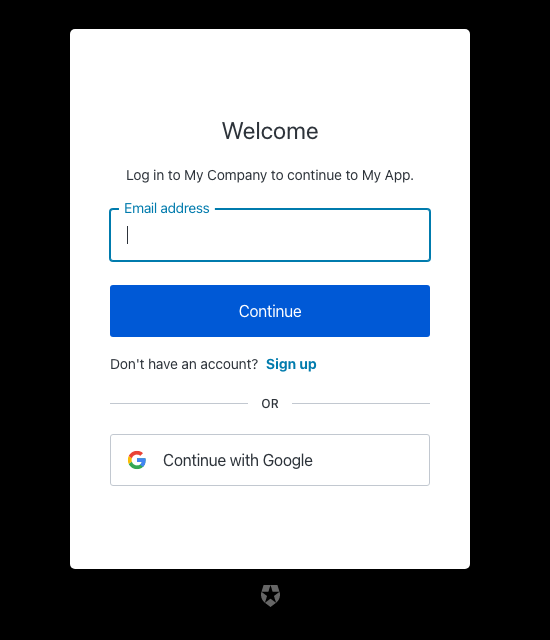
[Tailwind CSS v4](https://tailwindcss.com/docs/installation/using-vite)を使用して、このログイン画面にテーマを適用できます。
すべてのテーマとブランディングのカスタマイズは、ACULプロジェクトの`src/index.css`ディレクトリにあります。
1. Auth0 CLIツールを使用して、新しいテーマを適用する画面を含むACULプロジェクトを作成します。
```bash theme={null}
auth0 acul init
```
2. CSSファイル`src/index.css`を編集します。
```css theme={null}
/* In src/index.css */
:root {
/* Change these CSS variables to match your brand's primary color */
--primary: oklch(0.205 0 0);
--primary-foreground: oklch(0.985 0 0);
/* Override the theme variables to reference your custom color*/
--color-primary-button: var(--ul-theme-color-primary-button);
/* You can also override specific component colors directly */
--color-header: var(--primary-foreground);
--color-body-text: #000000;
--color-widget-bg: white;
--color-widget-border: transparent;
/* ... and many more */
}
```
`@theme inline`ブロック内のCSS変数は、基本コンポーネントによって使用されます。
プレフィックス`--ul-theme-`の付いたCSS変数は、デフォルトのユニバーサルログインスタイルに設定され、実行時にテナントに設定されたブランディングテーマによって自動的に上書きされます。詳しくは、プロジェクトディレクトリ内の`src/utils/theme/themeEngine.ts`ファイルをご覧ください。