> ## Documentation Index
> Fetch the complete documentation index at: https://docs-dev-fix-docs-5528-php-updates.mintlify.site/llms.txt
> Use this file to discover all available pages before exploring further.
# MFAにSMSと音声通知を設定する
> MFAにSMSと音声通知を構成する方法について説明します。
export const AuthCodeGroup = ({children, dropdown}) => {
const [processedChildren, setProcessedChildren] = useState(children);
useEffect(() => {
let unsubscribe = null;
function init() {
unsubscribe = window.autorun(() => {
const processChildren = node => {
if (typeof node === "string") {
let processedNode = node;
for (const [key, value] of window.rootStore.variableStore.values.entries()) {
const escapedKey = key.replaceAll(/[.*+?^${}()|[\]\\]/g, (String.raw)`\$&`);
processedNode = processedNode.replaceAll(new RegExp(escapedKey, "g"), value);
}
return processedNode;
} else if (Array.isArray(node)) {
return node.map(processChildren);
} else if (node && node.props && node.props.children) {
return {
...node,
props: {
...node.props,
children: processChildren(node.props.children)
}
};
}
return node;
};
setProcessedChildren(processChildren(children));
});
}
if (window.rootStore) {
init();
} else {
window.addEventListener("adu:storeReady", init);
}
return () => {
window.removeEventListener("adu:storeReady", init);
unsubscribe?.();
};
}, [children]);
return {processedChildren};
};
export const AuthCodeBlock = ({filename, icon, language, highlight, children}) => {
const [displayText, setDisplayText] = useState(children);
const [copyText, setCopyText] = useState(children);
const wrapperRef = React.useRef(null);
useEffect(() => {
let unsubscribe = null;
function init() {
if (!window.autorun || !window.rootStore) {
return;
}
unsubscribe = window.autorun(() => {
let processedChildrenForDisplay = children;
let processedChildrenForCopy = children;
for (const [key, value] of window.rootStore.variableStore.values.entries()) {
const escapedKey = key.replaceAll(/[.*+?^${}()|[\]\\]/g, (String.raw)`\$&`);
let displayValue = value;
if (key === "{yourClientSecret}" && value !== "{yourClientSecret}") {
displayValue = value.substring(0, 3) + "*****MASKED*****";
}
processedChildrenForDisplay = processedChildrenForDisplay.replaceAll(new RegExp(escapedKey, "g"), displayValue);
processedChildrenForCopy = processedChildrenForCopy.replaceAll(new RegExp(escapedKey, "g"), value);
}
setDisplayText(processedChildrenForDisplay);
setCopyText(processedChildrenForCopy);
});
}
if (window.rootStore) {
init();
} else {
window.addEventListener("adu:storeReady", init);
}
return () => {
window.removeEventListener("adu:storeReady", init);
unsubscribe?.();
};
}, [children]);
useEffect(() => {
if (!wrapperRef.current) return;
const originalWriteText = navigator.clipboard.writeText.bind(navigator.clipboard);
let isOverriding = false;
const handleClick = e => {
const button = e.target.closest('[data-testid="copy-code-button"]');
if (!button || !wrapperRef.current.contains(button)) return;
isOverriding = true;
navigator.clipboard.writeText = text => {
if (isOverriding) {
isOverriding = false;
navigator.clipboard.writeText = originalWriteText;
return originalWriteText(copyText);
}
return originalWriteText(text);
};
setTimeout(() => {
if (isOverriding) {
isOverriding = false;
navigator.clipboard.writeText = originalWriteText;
}
}, 100);
};
const wrapper = wrapperRef.current;
wrapper.addEventListener('click', handleClick, true);
return () => {
wrapper.removeEventListener('click', handleClick, true);
if (navigator.clipboard.writeText !== originalWriteText) {
navigator.clipboard.writeText = originalWriteText;
}
};
}, [copyText]);
return
{displayText}
;
};
総合電話エクスペリエンスは、すべての電話プロバイダーの構成をテナントで一元管理します。このため、異なる電話認証要素のそれぞれに同じ電話プロバイダーを何度も構成する必要はありません。詳細については、「[多要素認証に総合電話エクスペリエンスを構成する](/docs/ja-jp/customize/phone-messages/unified-phone/use-auth0s-unified-phone-experience-for-multi-factor-authentication)」を参照してください。
SMSまたは音声を認証要素に使用している場合、エンドユーザーがアプリケーションで認証を行おうとすると、SMSまたは音声を介してコードが送られてきます。エンドユーザーはこのコードを入力し、トランザクションを完了する必要があります。これは、エンドユーザーがログイン資格情報を知っており、かつMFAに使用するために登録したデバイスを所有しているということになります。
DashboardまたはManagement APIを使って、SMSまたは音声を通じてメッセージを送信するか、エンドユーザーにコードの配信方法を選んでもらうように、SMSと音声要素を構成することができます。アクションを使って配信プロバイダーを構成したり、Twilioアカウントを構成したり、または顧客にSMSのみを送信したい場合は、Auth0のデフォルトのメッセージ配信サービスを構成したりすることができます。MFAに音声通知を有効にするには、ユニバーサルログインエクスペリエンスを使用する必要があります。
この機能が利用できるかどうかは、使用しているログイン実装とAuth0プラン(または契約)によります。詳細については、「[価格設定](https://auth0.com/pricing)」をお読みください。
## 仕組み
SMSと音声が有効な場合、登録オプションとしてコードがSMSまたは音声を通じてユーザーに送られてきます。
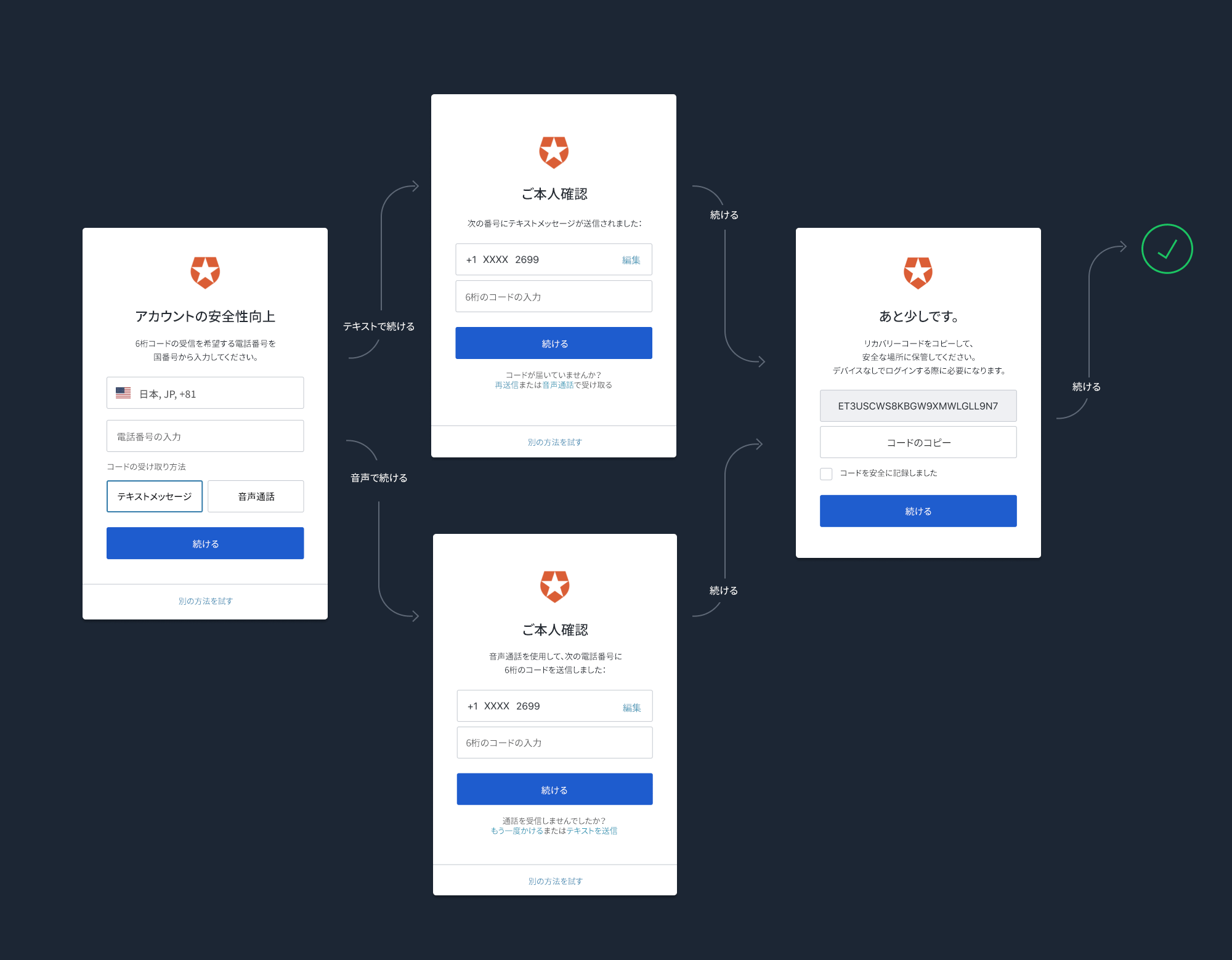 SMSのみを有効にする場合、フローはもっと単純です。
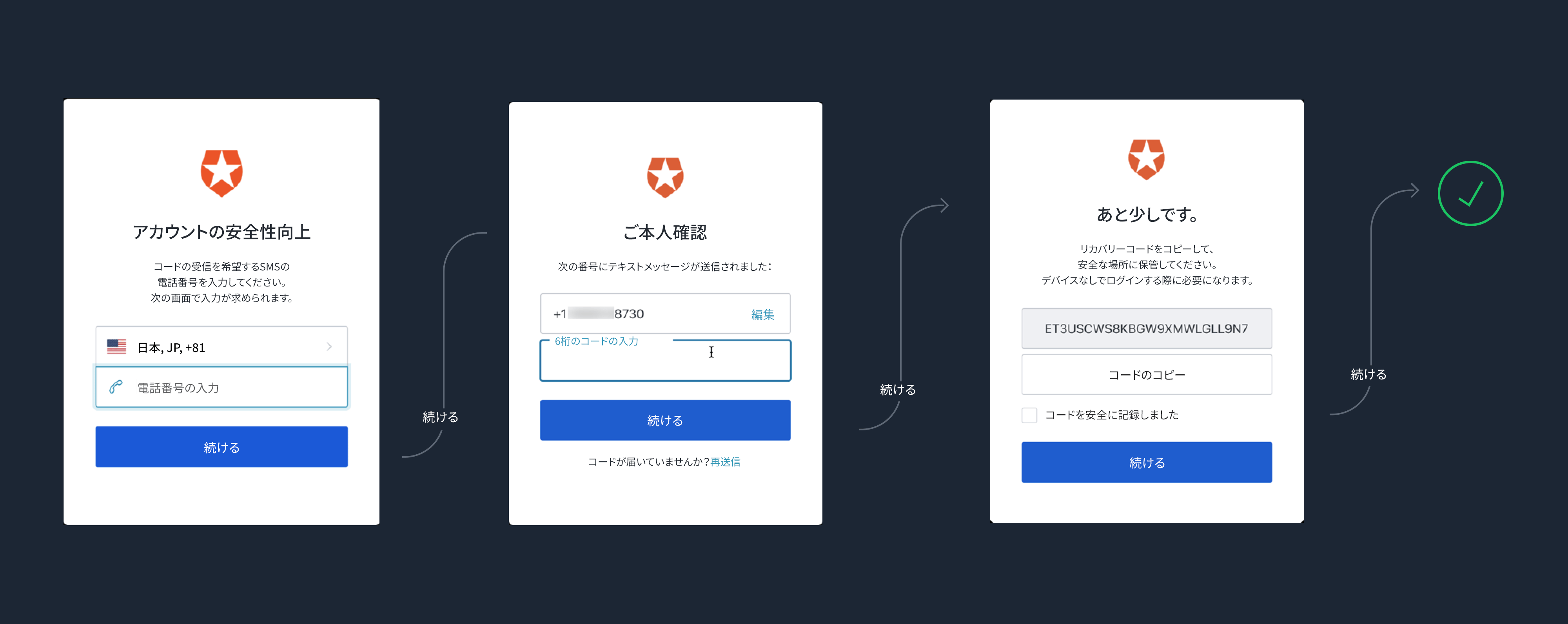 ユーザーが登録後に認証を行う場合は、登録した電話に音声またはSMSメッセージが送られてきます。
## Dashboardの使用
1. [[Dashboard]>[Security(セキュリティ)]>[Multi-factor Auth(多要素認証)]](https://manage.auth0.com/#/multifactor-auth)の順に進みます。
2. **[Phone Message(電話メッセージ)]** をクリックし、上部のトグルスイッチを有効にします。
3. 希望するメッセージ配信プロバイダーを選択します。
4. ユーザーがSMSと音声で認証を行えるようにするには、SMSと音声要素を有効にし、希望する配信方法を選択する必要があります。
1. **Auth0** :このプロバイダーを使って音声メッセージを送信することはできません。Auth0の内部で構成されたSMS配信プロバイダーを使ってSMSメッセージを送信します。評価・テスト目的でのみ使用でき、テナントのライフタイム全体にわたって送信できるテナント当たりのメッセージ数は最大100件です。100件の上限に達すると、新しいコードは届きません。
2. **Twilio** :SMSでは[Twilio Programmable SMS API](https://www.twilio.com/sms)、音声では[Twilio Programmable Voice API](https://www.twilio.com/voice)をそれぞれ使ってメッセージを送信します。Twilio Life Credentials(Test Credentialsでなく)を使用します。これは、実稼働環境でメッセージを送信することのみを意図しています。
3. **カスタム** :[電話メッセージの送信フロー](/docs/ja-jp/customize/actions/explore-triggers/mfa-notifications-trigger)でアクションを呼び出して、メッセージを送信します。
ユーザーがSMSテキストメッセージ、音声通話、またはその両方を受け取る、という選択肢の中から1つを選ぶこともできます。
### Twilioの構成
Twilioでは一括インポートの移行と確認に最大8週間かかるかもしれないことに注意してください。詳細については、[Twilioヘルプセンター](https://help.twilio.com/articles/223179468-How-long-does-it-take-to-port-a-number-to-Twilio)をご覧ください。
TwilioからSMSを配信する場合は、以下の手順に従ってSMS要素を構成します。
1. Twilioでアカウントを開きます。[Twilio Account SID](https://www.twilio.com/help/faq/twilio-basics/what-is-an-application-sid)と[Twilio Auth Token](https://www.twilio.com/help/faq/twilio-basics/what-is-the-auth-token-and-how-can-i-change-it)が必要です。これらは、SMSをユーザーに送信するためにAuth0が使用するTwilio API資格情報です。
2. [SMS](https://support.twilio.com/hc/en-us/articles/223181108-How-International-SMS-Permissions-work)または[音声](https://www.twilio.com/console/voice/calls/geo-permissions)の地理的な地域のアクセス許可を有効にする必要もあります。音声を使用する場合、音声通話ができるように、アカウントでTwilioの電話番号を有効にする必要があります。この番号は、[Twilioで検証された](https://support.twilio.com/hc/en-us/articles/223180048-Adding-a-Verified-Phone-Number-or-Caller-ID-with-Twilio)外部の電話番号、またはアカウント内から購入してセットアップしたTwilioの電話番号のどちらでもかまいません。
3. 接続を構成します。[[Dashboard]>[Security - Multi-factor Auth(セキュリティ - 多要素認証)]](https://manage.auth0.com/#/security/mfa)の順に進み、**[Phone Message(電話メッセージ)]** を選択します。
4. **[Choose your delivery provider(配信プロバイダーの選択)]** で **[Twilio]** を選択し、配信方法を選びます。
5. 該当するフィールドに**Twilio Account SID**と**Twilio Auth Token** を入力します。
6. **[SMS Source(SMSソース)]** を選択します。
1. **[Use From(番号を使用)]** を選択する場合、発信するSMSメッセージの「**From**」番号を入力する必要があります。これは、Twilioで構成できる場合もあります。
2. **[Use Messaging Services(メッセージングサービスを使用)]** を選択する場合、[メッセージングサービスSID](https://www.twilio.com/docs/sms/services/services-send-messages)を入力する必要があります。
3. 音声を使用している場合は、SMSの**メッセージサービス** を使用している場合でも、「**From**」番号を必ず構成する必要があります。SMSと音声メッセージの両方を送信するように電話番号が構成されていることを確認してください。
7. **[Save(保存)]** をクリックします。
### SMSまたは音声メッセージテンプレートをカスタマイズする
SMSと音声メッセージテンプレートをカスタマイズすることができます。詳細については、「[SMSと音声メッセージをカスタマイズする](/docs/ja-jp/customize/customize-sms-or-voice-messages)」をお読みください。
## Management APIの使用
Management APIを使用して、どのメッセージ配信方法を有効にするかを構成できます。その際に使用されるのが、`/api/v2/guardian/factors/phone/message-types`エンドポイントです。`message_types`パラメーターは、`["sms"]`、`["voice"]`、または`["sms", "voice"]`を使用できる配列です。APIを呼び出すには、`update:guardian_factors`スコープをベアラーに持つ[Management APIアクセストークン](/docs/ja-jp/secure/tokens/access-tokens/management-api-access-tokens)が必要です。
````bash cURL theme={null}
curl --request PUT \
--url 'https://{yourDomain}/api/v2/guardian/factors/phone/message-types' \
--header 'authorization: Bearer MGMT_API_ACCESS_TOKEN' \
--header 'content-type: application/json' \
--data '{ "message_types": ["sms", "voice"] }'
``` lines
```csharp C#
var client = new RestClient("https://{yourDomain}/api/v2/guardian/factors/phone/message-types");
var request = new RestRequest(Method.PUT);
request.AddHeader("content-type", "application/json");
request.AddHeader("authorization", "Bearer MGMT_API_ACCESS_TOKEN");
request.AddParameter("application/json", "{ "message_types": ["sms", "voice"] }", ParameterType.RequestBody);
IRestResponse response = client.Execute(request);
````
````go Go theme={null}
package main
import (
"fmt"
"strings"
"net/http"
"io/ioutil"
)
func main() {
url := "https://{yourDomain}/api/v2/guardian/factors/phone/message-types"
payload := strings.NewReader("{ "message_types": ["sms", "voice"] }")
req, _ := http.NewRequest("PUT", url, payload)
req.Header.Add("content-type", "application/json")
req.Header.Add("authorization", "Bearer MGMT_API_ACCESS_TOKEN")
res, _ := http.DefaultClient.Do(req)
defer res.Body.Close()
body, _ := ioutil.ReadAll(res.Body)
fmt.Println(res)
fmt.Println(string(body))
}
``` lines
```java Java
HttpResponse response = Unirest.put("https://{yourDomain}/api/v2/guardian/factors/phone/message-types")
.header("content-type", "application/json")
.header("authorization", "Bearer MGMT_API_ACCESS_TOKEN")
.body("{ "message_types": ["sms", "voice"] }")
.asString();
````
````javascript Node.JS theme={null}
var axios = require("axios").default;
var options = {
method: 'PUT',
url: 'https://{yourDomain}/api/v2/guardian/factors/phone/message-types',
headers: {
'content-type': 'application/json',
authorization: 'Bearer MGMT_API_ACCESS_TOKEN'
},
data: {message_types: ['sms', 'voice']}
};
axios.request(options).then(function (response) {
console.log(response.data);
}).catch(function (error) {
console.error(error);
});
``` lines
```objc Obj-C
#import
NSDictionary \*headers = @{ @"content-type": @"application/json",
@"authorization": @"Bearer MGMT_API_ACCESS_TOKEN" };
NSDictionary \*parameters = @{ @"message_types": @[ @"sms", @"voice" ] };
NSData \*postData = [NSJSONSerialization dataWithJSONObject:parameters options:0 error:nil];
NSMutableURLRequest \*request = [NSMutableURLRequest requestWithURL:[NSURL URLWithString:@"https://{yourDomain}/api/v2/guardian/factors/phone/message-types"]
cachePolicy:NSURLRequestUseProtocolCachePolicy
timeoutInterval:10.0];
[request setHTTPMethod:@"PUT"];
[request setAllHTTPHeaderFields:headers];
[request setHTTPBody:postData];
NSURLSession \*session = [NSURLSession sharedSession];
NSURLSessionDataTask \*dataTask = [session dataTaskWithRequest:request
completionHandler:^(NSData \*data, NSURLResponse \*response, NSError \*error) {
if (error) {
NSLog(@"%@", error);
} else {
NSHTTPURLResponse \*httpResponse = (NSHTTPURLResponse \*) response;
NSLog(@"%@", httpResponse);
}
}];
[dataTask resume];
````
````php PHP theme={null}
$curl = curl_init();
curl_setopt_array($curl, [
CURLOPT_URL => "https://{yourDomain}/api/v2/guardian/factors/phone/message-types",
CURLOPT_RETURNTRANSFER => true,
CURLOPT_ENCODING => "",
CURLOPT_MAXREDIRS => 10,
CURLOPT_TIMEOUT => 30,
CURLOPT_HTTP_VERSION => CURL_HTTP_VERSION_1_1,
CURLOPT_CUSTOMREQUEST => "PUT",
CURLOPT_POSTFIELDS => "{ "message_types": ["sms", "voice"] }",
CURLOPT_HTTPHEADER => [
"authorization: Bearer MGMT_API_ACCESS_TOKEN",
"content-type: application/json"
],
]);
$response = curl_exec($curl);
$err = curl_error($curl);
curl_close($curl);
if ($err) {
echo "cURL Error #:" . $err;
} else {
echo $response;
}
``` lines
```python Python
import http.client
conn = http.client.HTTPSConnection("")
payload = "{ "message_types": ["sms", "voice"] }"
headers = {
'content-type': "application/json",
'authorization': "Bearer MGMT_API_ACCESS_TOKEN"
}
conn.request("PUT", "/{yourDomain}/api/v2/guardian/factors/phone/message-types", payload, headers)
res = conn.getresponse()
data = res.read()
print(data.decode("utf-8"))
````
````ruby Ruby theme={null}
require 'uri'
require 'net/http'
require 'openssl'
url = URI("https://{yourDomain}/api/v2/guardian/factors/phone/message-types")
http = Net::HTTP.new(url.host, url.port)
http.use_ssl = true
http.verify_mode = OpenSSL::SSL::VERIFY_NONE
request = Net::HTTP::Put.new(url)
request["content-type"] = 'application/json'
request["authorization"] = 'Bearer MGMT_API_ACCESS_TOKEN'
request.body = "{ "message_types": ["sms", "voice"] }"
response = http.request(request)
puts response.read_body
``` lines
```swift Swift
import Foundation
let headers = [
"content-type": "application/json",
"authorization": "Bearer MGMT_API_ACCESS_TOKEN"
]
let parameters = ["message_types": ["sms", "voice"]] as [String : Any]
let postData = JSONSerialization.data(withJSONObject: parameters, options: [])
let request = NSMutableURLRequest(url: NSURL(string: "https://{yourDomain}/api/v2/guardian/factors/phone/message-types")! as URL,
cachePolicy: .useProtocolCachePolicy,
timeoutInterval: 10.0)
request.httpMethod = "PUT"
request.allHTTPHeaderFields = headers
request.httpBody = postData as Data
let session = URLSession.shared
let dataTask = session.dataTask(with: request as URLRequest, completionHandler: { (data, response, error) -> Void in
if (error != nil) {
print(error)
} else {
let httpResponse = response as? HTTPURLResponse
print(httpResponse)
}
})
dataTask.resume()
````
## 統合されたSMSメッセージングプロバイダー
Auth0はデフォルトで、Twilioを介したメッセージの送信に対応していますが、異なるSMSプロバイダーで特定のロジックを追加してからメッセージを送信するか、ユーザーまたはアプリケーションに応じて異なるメッセージを送信することができます。このためには、[電話メッセージの送信フロー](/docs/ja-jp/customize/actions/explore-triggers/mfa-notifications-trigger)で統合された[アクション](/docs/ja-jp/customize/actions)のいずれかを使用するように、SMS MFAを構成します。
統合されたSMSメッセージングプロバイダーには以下のものがあります。
* [Amazon SNS](https://marketplace.auth0.com/integrations/amazon-sms-provider)
* [ClickSend](https://marketplace.auth0.com/integrations/clicksend-sms)
* [Esendex](https://marketplace.auth0.com/integrations/esendex-sms-provider)
* [Infobip](https://marketplace.auth0.com/integrations/infobip-sms-provider)
* [Mitto](https://marketplace.auth0.com/integrations/mitto-sms-provider)
* [Telesign](https://marketplace.auth0.com/integrations/telesign-sms-provider)
* [Vonage](https://marketplace.auth0.com/integrations/vonage-sms-provider)
## カスタム電話プロバイダー
アクションを使ってカスタム電話プロバイダーを構成することもできます。詳細については、「[カスタム電話プロバイダーを構成する](/docs/ja-jp/customize/phone-messages/configure-phone-messaging-providers/configure-a-custom-phone-provider)」をお読みください。
## セキュリティに関する考慮事項
電話メッセージングプロバイダーを使用する場合、サインアップフローを悪用する攻撃者によって金銭的損失を被る可能性があることに注意してください。e.
Auth0では、各ユーザーが1時間あたりに送信できるSMSまたは音声メッセージは最大10件で、メールまたはAuthenticatorsを介したOTPフローの要求数は5分ごとに最大5件です。(バーストレートは10ですが、新規要求で送信されるのは1時間あたりに1音声メッセージのみです。)アカウントをさらに保護するには、以下のことを考慮してください。
* [総当たり攻撃防御](/docs/ja-jp/secure/attack-protection/brute-force-protection)を有効にします。1分あたりにサインアップ要求数が50件を超えようとすると、IPはブロックされます。
* [ログストリーミング](/docs/ja-jp/customize/log-streams)を有効にし、`gd_send_voice`または`gd_send_voice_failure`[ログイベント](/docs/ja-jp/deploy-monitor/logs/log-event-type-codes)数が急増したときは、お気に入りの監視ツールを使ってアラートを作成します。
電話メッセージングプロバイダーには、その他の保護対策も装備されています。Twilioを使用している場合は、「[Twilioのアンチフラウド開発者ガイド](https://www.twilio.com/docs/usage/anti-fraud-developer-guide)」をお読みください。次のオプションを検討してください。
* [SMS](https://support.twilio.com/hc/en-us/articles/223181108-How-International-SMS-Permissions-work)と[音声](https://support.twilio.com/hc/en-us/articles/223180228-International-Voice-Dialing-Geographic-Permissions-Geo-Permissions-and-How-They-Work)のメッセージを送信する国を制限します。[トールフラウド](https://www.twilio.com/learn/voice-and-video/toll-fraud)のリスクが高い国、または通常取引を行わない通話料金が高額な国がある場合は、このように制限しておくと特に役立ちます。
* Twilioが提供する[利用トリガー](https://support.twilio.com/hc/en-us/articles/223132387-Protect-your-Twilio-project-from-Fraud-with-Usage-Triggers)を有効にし、アカウントをフラウドとコーディングエラーから守ります。
## もっと詳しく
* [SMSおよび音声Authenticatorの登録とチャレンジ](/docs/ja-jp/secure/multi-factor-authentication/authenticate-using-ropg-flow-with-mfa/enroll-challenge-sms-voice-authenticators)
* [攻撃防御](/docs/ja-jp/secure/attack-protection)
* [ログストリーミング](/docs/ja-jp/customize/log-streams)
ユーザーが登録後に認証を行う場合は、登録した電話に音声またはSMSメッセージが送られてきます。
## Dashboardの使用
1. [[Dashboard]>[Security(セキュリティ)]>[Multi-factor Auth(多要素認証)]](https://manage.auth0.com/#/multifactor-auth)の順に進みます。
2. **[Phone Message(電話メッセージ)]** をクリックし、上部のトグルスイッチを有効にします。
3. 希望するメッセージ配信プロバイダーを選択します。
4. ユーザーがSMSと音声で認証を行えるようにするには、SMSと音声要素を有効にし、希望する配信方法を選択する必要があります。
1. **Auth0** :このプロバイダーを使って音声メッセージを送信することはできません。Auth0の内部で構成されたSMS配信プロバイダーを使ってSMSメッセージを送信します。評価・テスト目的でのみ使用でき、テナントのライフタイム全体にわたって送信できるテナント当たりのメッセージ数は最大100件です。100件の上限に達すると、新しいコードは届きません。
2. **Twilio** :SMSでは[Twilio Programmable SMS API](https://www.twilio.com/sms)、音声では[Twilio Programmable Voice API](https://www.twilio.com/voice)をそれぞれ使ってメッセージを送信します。Twilio Life Credentials(Test Credentialsでなく)を使用します。これは、実稼働環境でメッセージを送信することのみを意図しています。
3. **カスタム** :[電話メッセージの送信フロー](/docs/ja-jp/customize/actions/explore-triggers/mfa-notifications-trigger)でアクションを呼び出して、メッセージを送信します。
ユーザーがSMSテキストメッセージ、音声通話、またはその両方を受け取る、という選択肢の中から1つを選ぶこともできます。
### Twilioの構成
Twilioでは一括インポートの移行と確認に最大8週間かかるかもしれないことに注意してください。詳細については、[Twilioヘルプセンター](https://help.twilio.com/articles/223179468-How-long-does-it-take-to-port-a-number-to-Twilio)をご覧ください。
TwilioからSMSを配信する場合は、以下の手順に従ってSMS要素を構成します。
1. Twilioでアカウントを開きます。[Twilio Account SID](https://www.twilio.com/help/faq/twilio-basics/what-is-an-application-sid)と[Twilio Auth Token](https://www.twilio.com/help/faq/twilio-basics/what-is-the-auth-token-and-how-can-i-change-it)が必要です。これらは、SMSをユーザーに送信するためにAuth0が使用するTwilio API資格情報です。
2. [SMS](https://support.twilio.com/hc/en-us/articles/223181108-How-International-SMS-Permissions-work)または[音声](https://www.twilio.com/console/voice/calls/geo-permissions)の地理的な地域のアクセス許可を有効にする必要もあります。音声を使用する場合、音声通話ができるように、アカウントでTwilioの電話番号を有効にする必要があります。この番号は、[Twilioで検証された](https://support.twilio.com/hc/en-us/articles/223180048-Adding-a-Verified-Phone-Number-or-Caller-ID-with-Twilio)外部の電話番号、またはアカウント内から購入してセットアップしたTwilioの電話番号のどちらでもかまいません。
3. 接続を構成します。[[Dashboard]>[Security - Multi-factor Auth(セキュリティ - 多要素認証)]](https://manage.auth0.com/#/security/mfa)の順に進み、**[Phone Message(電話メッセージ)]** を選択します。
4. **[Choose your delivery provider(配信プロバイダーの選択)]** で **[Twilio]** を選択し、配信方法を選びます。
5. 該当するフィールドに**Twilio Account SID**と**Twilio Auth Token** を入力します。
6. **[SMS Source(SMSソース)]** を選択します。
1. **[Use From(番号を使用)]** を選択する場合、発信するSMSメッセージの「**From**」番号を入力する必要があります。これは、Twilioで構成できる場合もあります。
2. **[Use Messaging Services(メッセージングサービスを使用)]** を選択する場合、[メッセージングサービスSID](https://www.twilio.com/docs/sms/services/services-send-messages)を入力する必要があります。
3. 音声を使用している場合は、SMSの**メッセージサービス** を使用している場合でも、「**From**」番号を必ず構成する必要があります。SMSと音声メッセージの両方を送信するように電話番号が構成されていることを確認してください。
7. **[Save(保存)]** をクリックします。
### SMSまたは音声メッセージテンプレートをカスタマイズする
SMSと音声メッセージテンプレートをカスタマイズすることができます。詳細については、「[SMSと音声メッセージをカスタマイズする](/docs/ja-jp/customize/customize-sms-or-voice-messages)」をお読みください。
## Management APIの使用
Management APIを使用して、どのメッセージ配信方法を有効にするかを構成できます。その際に使用されるのが、`/api/v2/guardian/factors/phone/message-types`エンドポイントです。`message_types`パラメーターは、`["sms"]`、`["voice"]`、または`["sms", "voice"]`を使用できる配列です。APIを呼び出すには、`update:guardian_factors`スコープをベアラーに持つ[Management APIアクセストークン](/docs/ja-jp/secure/tokens/access-tokens/management-api-access-tokens)が必要です。
````bash cURL theme={null}
curl --request PUT \
--url 'https://{yourDomain}/api/v2/guardian/factors/phone/message-types' \
--header 'authorization: Bearer MGMT_API_ACCESS_TOKEN' \
--header 'content-type: application/json' \
--data '{ "message_types": ["sms", "voice"] }'
``` lines
```csharp C#
var client = new RestClient("https://{yourDomain}/api/v2/guardian/factors/phone/message-types");
var request = new RestRequest(Method.PUT);
request.AddHeader("content-type", "application/json");
request.AddHeader("authorization", "Bearer MGMT_API_ACCESS_TOKEN");
request.AddParameter("application/json", "{ "message_types": ["sms", "voice"] }", ParameterType.RequestBody);
IRestResponse response = client.Execute(request);
````
````go Go theme={null}
package main
import (
"fmt"
"strings"
"net/http"
"io/ioutil"
)
func main() {
url := "https://{yourDomain}/api/v2/guardian/factors/phone/message-types"
payload := strings.NewReader("{ "message_types": ["sms", "voice"] }")
req, _ := http.NewRequest("PUT", url, payload)
req.Header.Add("content-type", "application/json")
req.Header.Add("authorization", "Bearer MGMT_API_ACCESS_TOKEN")
res, _ := http.DefaultClient.Do(req)
defer res.Body.Close()
body, _ := ioutil.ReadAll(res.Body)
fmt.Println(res)
fmt.Println(string(body))
}
``` lines
```java Java
HttpResponse response = Unirest.put("https://{yourDomain}/api/v2/guardian/factors/phone/message-types")
.header("content-type", "application/json")
.header("authorization", "Bearer MGMT_API_ACCESS_TOKEN")
.body("{ "message_types": ["sms", "voice"] }")
.asString();
````
````javascript Node.JS theme={null}
var axios = require("axios").default;
var options = {
method: 'PUT',
url: 'https://{yourDomain}/api/v2/guardian/factors/phone/message-types',
headers: {
'content-type': 'application/json',
authorization: 'Bearer MGMT_API_ACCESS_TOKEN'
},
data: {message_types: ['sms', 'voice']}
};
axios.request(options).then(function (response) {
console.log(response.data);
}).catch(function (error) {
console.error(error);
});
``` lines
```objc Obj-C
#import
NSDictionary \*headers = @{ @"content-type": @"application/json",
@"authorization": @"Bearer MGMT_API_ACCESS_TOKEN" };
NSDictionary \*parameters = @{ @"message_types": @[ @"sms", @"voice" ] };
NSData \*postData = [NSJSONSerialization dataWithJSONObject:parameters options:0 error:nil];
NSMutableURLRequest \*request = [NSMutableURLRequest requestWithURL:[NSURL URLWithString:@"https://{yourDomain}/api/v2/guardian/factors/phone/message-types"]
cachePolicy:NSURLRequestUseProtocolCachePolicy
timeoutInterval:10.0];
[request setHTTPMethod:@"PUT"];
[request setAllHTTPHeaderFields:headers];
[request setHTTPBody:postData];
NSURLSession \*session = [NSURLSession sharedSession];
NSURLSessionDataTask \*dataTask = [session dataTaskWithRequest:request
completionHandler:^(NSData \*data, NSURLResponse \*response, NSError \*error) {
if (error) {
NSLog(@"%@", error);
} else {
NSHTTPURLResponse \*httpResponse = (NSHTTPURLResponse \*) response;
NSLog(@"%@", httpResponse);
}
}];
[dataTask resume];
````
````php PHP theme={null}
$curl = curl_init();
curl_setopt_array($curl, [
CURLOPT_URL => "https://{yourDomain}/api/v2/guardian/factors/phone/message-types",
CURLOPT_RETURNTRANSFER => true,
CURLOPT_ENCODING => "",
CURLOPT_MAXREDIRS => 10,
CURLOPT_TIMEOUT => 30,
CURLOPT_HTTP_VERSION => CURL_HTTP_VERSION_1_1,
CURLOPT_CUSTOMREQUEST => "PUT",
CURLOPT_POSTFIELDS => "{ "message_types": ["sms", "voice"] }",
CURLOPT_HTTPHEADER => [
"authorization: Bearer MGMT_API_ACCESS_TOKEN",
"content-type: application/json"
],
]);
$response = curl_exec($curl);
$err = curl_error($curl);
curl_close($curl);
if ($err) {
echo "cURL Error #:" . $err;
} else {
echo $response;
}
``` lines
```python Python
import http.client
conn = http.client.HTTPSConnection("")
payload = "{ "message_types": ["sms", "voice"] }"
headers = {
'content-type': "application/json",
'authorization': "Bearer MGMT_API_ACCESS_TOKEN"
}
conn.request("PUT", "/{yourDomain}/api/v2/guardian/factors/phone/message-types", payload, headers)
res = conn.getresponse()
data = res.read()
print(data.decode("utf-8"))
````
````ruby Ruby theme={null}
require 'uri'
require 'net/http'
require 'openssl'
url = URI("https://{yourDomain}/api/v2/guardian/factors/phone/message-types")
http = Net::HTTP.new(url.host, url.port)
http.use_ssl = true
http.verify_mode = OpenSSL::SSL::VERIFY_NONE
request = Net::HTTP::Put.new(url)
request["content-type"] = 'application/json'
request["authorization"] = 'Bearer MGMT_API_ACCESS_TOKEN'
request.body = "{ "message_types": ["sms", "voice"] }"
response = http.request(request)
puts response.read_body
``` lines
```swift Swift
import Foundation
let headers = [
"content-type": "application/json",
"authorization": "Bearer MGMT_API_ACCESS_TOKEN"
]
let parameters = ["message_types": ["sms", "voice"]] as [String : Any]
let postData = JSONSerialization.data(withJSONObject: parameters, options: [])
let request = NSMutableURLRequest(url: NSURL(string: "https://{yourDomain}/api/v2/guardian/factors/phone/message-types")! as URL,
cachePolicy: .useProtocolCachePolicy,
timeoutInterval: 10.0)
request.httpMethod = "PUT"
request.allHTTPHeaderFields = headers
request.httpBody = postData as Data
let session = URLSession.shared
let dataTask = session.dataTask(with: request as URLRequest, completionHandler: { (data, response, error) -> Void in
if (error != nil) {
print(error)
} else {
let httpResponse = response as? HTTPURLResponse
print(httpResponse)
}
})
dataTask.resume()
````
## 統合されたSMSメッセージングプロバイダー
Auth0はデフォルトで、Twilioを介したメッセージの送信に対応していますが、異なるSMSプロバイダーで特定のロジックを追加してからメッセージを送信するか、ユーザーまたはアプリケーションに応じて異なるメッセージを送信することができます。このためには、[電話メッセージの送信フロー](/docs/ja-jp/customize/actions/explore-triggers/mfa-notifications-trigger)で統合された[アクション](/docs/ja-jp/customize/actions)のいずれかを使用するように、SMS MFAを構成します。
統合されたSMSメッセージングプロバイダーには以下のものがあります。
* [Amazon SNS](https://marketplace.auth0.com/integrations/amazon-sms-provider)
* [ClickSend](https://marketplace.auth0.com/integrations/clicksend-sms)
* [Esendex](https://marketplace.auth0.com/integrations/esendex-sms-provider)
* [Infobip](https://marketplace.auth0.com/integrations/infobip-sms-provider)
* [Mitto](https://marketplace.auth0.com/integrations/mitto-sms-provider)
* [Telesign](https://marketplace.auth0.com/integrations/telesign-sms-provider)
* [Vonage](https://marketplace.auth0.com/integrations/vonage-sms-provider)
## カスタム電話プロバイダー
アクションを使ってカスタム電話プロバイダーを構成することもできます。詳細については、「[カスタム電話プロバイダーを構成する](/docs/ja-jp/customize/phone-messages/configure-phone-messaging-providers/configure-a-custom-phone-provider)」をお読みください。
## セキュリティに関する考慮事項
電話メッセージングプロバイダーを使用する場合、サインアップフローを悪用する攻撃者によって金銭的損失を被る可能性があることに注意してください。e.
Auth0では、各ユーザーが1時間あたりに送信できるSMSまたは音声メッセージは最大10件で、メールまたはAuthenticatorsを介したOTPフローの要求数は5分ごとに最大5件です。(バーストレートは10ですが、新規要求で送信されるのは1時間あたりに1音声メッセージのみです。)アカウントをさらに保護するには、以下のことを考慮してください。
* [総当たり攻撃防御](/docs/ja-jp/secure/attack-protection/brute-force-protection)を有効にします。1分あたりにサインアップ要求数が50件を超えようとすると、IPはブロックされます。
* [ログストリーミング](/docs/ja-jp/customize/log-streams)を有効にし、`gd_send_voice`または`gd_send_voice_failure`[ログイベント](/docs/ja-jp/deploy-monitor/logs/log-event-type-codes)数が急増したときは、お気に入りの監視ツールを使ってアラートを作成します。
電話メッセージングプロバイダーには、その他の保護対策も装備されています。Twilioを使用している場合は、「[Twilioのアンチフラウド開発者ガイド](https://www.twilio.com/docs/usage/anti-fraud-developer-guide)」をお読みください。次のオプションを検討してください。
* [SMS](https://support.twilio.com/hc/en-us/articles/223181108-How-International-SMS-Permissions-work)と[音声](https://support.twilio.com/hc/en-us/articles/223180228-International-Voice-Dialing-Geographic-Permissions-Geo-Permissions-and-How-They-Work)のメッセージを送信する国を制限します。[トールフラウド](https://www.twilio.com/learn/voice-and-video/toll-fraud)のリスクが高い国、または通常取引を行わない通話料金が高額な国がある場合は、このように制限しておくと特に役立ちます。
* Twilioが提供する[利用トリガー](https://support.twilio.com/hc/en-us/articles/223132387-Protect-your-Twilio-project-from-Fraud-with-Usage-Triggers)を有効にし、アカウントをフラウドとコーディングエラーから守ります。
## もっと詳しく
* [SMSおよび音声Authenticatorの登録とチャレンジ](/docs/ja-jp/secure/multi-factor-authentication/authenticate-using-ropg-flow-with-mfa/enroll-challenge-sms-voice-authenticators)
* [攻撃防御](/docs/ja-jp/secure/attack-protection)
* [ログストリーミング](/docs/ja-jp/customize/log-streams)